AI agents for real estate handle inquiry response, follow-up sequences, and showing coordination — the communication layer that determines whether a lead converts or goes silent. Real estate professionals using agents respond to new inquiries within minutes, run nurture sequences across 20–40 active leads simultaneously, and reserve direct contact time for showings, negotiations, and closings.
A new property inquiry arrives at 6 pm. The prospect wants to see a two-bedroom in the price range they discussed last weekend. By Wednesday morning, they've booked a showing with someone else. Real estate professionals who rely on manual follow-up lose deals in the gap between inquiry and first response. An AI agent — software that reads the inquiry, decides what response is needed, and acts on it without a person assembling each step, as covered in what an AI agent is — monitors inbound channels, sends the first response within minutes, and manages the follow-up cadence until the lead is ready for a direct conversation. The real estate professional takes over when there's a showing to schedule, an offer to discuss, or a deal to close.
Speed decides which real estate professional gets the deal
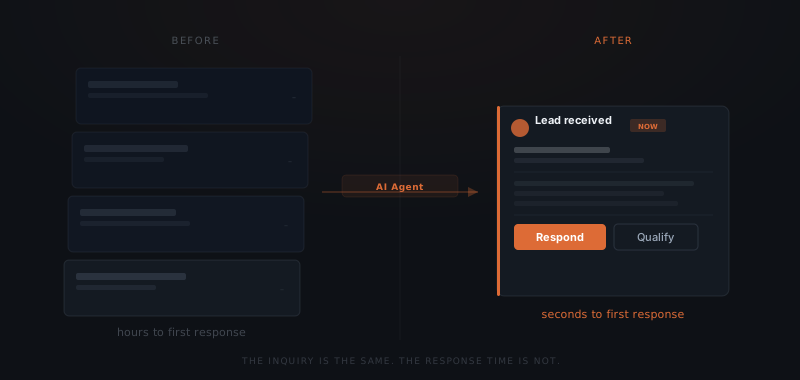
A lead contacted within 5 minutes is 9x more likely to convert than one contacted after 30 minutes, according to a Harvard Business Review study by James Oldroyd, Kristina McElheran, and David Elkington analyzing response time across 15,000 leads.[¹] Buyers contact multiple real estate professionals simultaneously. The first substantive response determines who gets the engagement.
NAR's 2024 Profile of Home Buyers and Sellers found that 73% of buyers interviewed only one real estate agent before making their hiring decision.[²] First-mover advantage in real estate is not about having the best pitch — it's about being available at the moment the buyer is ready to act.
Real estate professionals managing 20–40 active leads cannot maintain fast response times and run active transactions simultaneously. The two jobs compete for the same attention. Response time degrades at exactly the moment pipeline pressure is highest — when multiple transactions are in progress and new inquiries arrive in parallel.
What an AI agent manages across the inquiry-to-close cycle
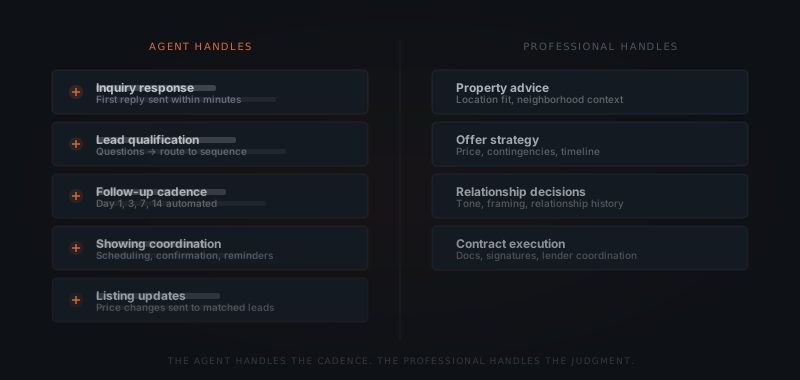
An AI agent monitors inbound channels — email, web forms, Zillow, Realtor.com — and responds to new inquiries immediately. The agent sends a structured first response, qualifies the lead with a defined set of questions, and routes the lead into the appropriate follow-up sequence.
Lead qualification. The agent identifies which inquiries are ready to book a showing, which need nurturing, and which have no near-term buying intent. A lead who says "thinking about buying sometime next year" enters a long-nurture sequence. A lead who says "want to see something this weekend" receives an immediate showing coordination workflow.
Follow-up cadence. The agent sends messages at defined intervals — day 1, day 3, day 7, day 14 — adjusting based on engagement signals. A lead who opens an email but doesn't reply receives a different follow-up than one who hasn't opened anything. The cadence runs across all active leads simultaneously without manual scheduling.
| Day | Message purpose | Sequence stops when |
|---|---|---|
| Day 1 | Confirm inquiry received, outline next steps | Lead replies or books a showing |
| Day 3 | Check-in — re-engage if no response | Lead replies or books a showing |
| Day 7 | Re-engagement — surface a relevant property or qualifying question | Lead replies or books a showing |
| Day 14 | Final outreach — leave the door open | Lead replies or books a showing |
Showing coordination. When a lead confirms interest, the agent handles the scheduling exchange — proposing available times, sending the confirmation, and sending the day-before reminder. The real estate professional receives a completed calendar entry, not a back-and-forth thread.
Listing updates. When a property matching a buyer's stated criteria changes in price or availability, the agent sends the notification without the professional doing manual outreach for each lead.
The deal goes to whoever replies first. An agent never checks the clock.
For the sequencing framework — which workflows to automate first across a service business — see which workflows to automate first.
What stays with the real estate professional
An AI agent manages the communication cadence. Property advice, offer negotiations, and contract decisions require the judgment and licensing of a real estate professional. The agent does not make these decisions.
Property advice. A buyer asks which of three neighborhoods fits their commute and school priorities. An AI agent does not know their family situation, employer location, or commute tolerance. The real estate professional knows — or asks the questions to find out.
Offer strategy. An offer is a commercial judgment: how much, what contingencies, what timeline. The agent surfaces comparables and flags deadlines. The professional decides the number and the terms.
Relationship framing. A client returning after a failed offer needs a different conversation than a first-time buyer. The agent runs the workflow. The professional handles what the workflow cannot encode.
Contract management. Document collection, signature sequencing, and lender coordination involve regulated decisions that stay with the licensed professional and, where required, the transaction coordinator.
| Task | Agent | Real estate professional |
|---|---|---|
| Inquiry response | ✓ | |
| Lead qualification | ✓ | |
| Follow-up cadence (days 1, 3, 7, 14) | ✓ | |
| Showing coordination | ✓ | |
| Listing update notifications | ✓ | |
| Property advice | ✓ | |
| Offer strategy and pricing | ✓ | |
| Relationship decisions | ✓ | |
| Contract management | ✓ |
How to set up a real estate agent workflow
Map your lead sources
Identify every channel where new inquiries arrive: Zillow, Realtor.com, your website, email referrals. The agent connects to each source. Channels outside the setup receive no coverage.
Define qualification criteria
Set the criteria that move a lead from general inquiry to showing-ready: budget range, timeline, property type, location. These become the qualifying questions in the agent's first response.
Write the follow-up sequence
Draft the messages for day 1, day 3, day 7, and day 14. The agent sends from your name and email address. The sequence stops automatically when the lead responds or books a showing.
Connect your calendar and CRM
The agent needs access to your availability for showing scheduling and your CRM to log contact activity. Follow Up Boss, HubSpot, and Salesforce all connect directly. Google Calendar and Outlook both work for scheduling coordination.
Set the handoff trigger
Define what signals a lead is ready for a direct conversation: a showing request, a specific question about an offer, or a reply indicating active buying intent. The agent flags these and routes them to your queue.
For how agents handle ongoing communication after the first showing, see AI agents for follow-up. For a full breakdown of what makes a process ready to hand to an agent, see how to know if a business process is ready to hand to an AI agent.
Tools and integrations a real estate agent workflow connects to
The specific platforms the agent uses depend on which systems the professional already has in place. The table below covers the standard connection points for a lead follow-up and showing coordination workflow.
| Platform | Role in the workflow | Notes |
|---|---|---|
| Zillow / Realtor.com | Inbound lead capture — new inquiry triggers agent response | Requires Zillow Premier Agent API or form webhook |
| Gmail / Outlook | Outbound follow-up emails sent from the professional's address | OAuth connection — agent drafts, sends from real address |
| Google Calendar / Outlook Calendar | Showing availability check and confirmation write | Read availability, write confirmed appointments |
| Follow Up Boss | Lead records, activity logging, status updates | Native API — most widely used real estate CRM |
| HubSpot | Pipeline management for higher-volume teams | Native API — used where FUB not already in place |
| Pipedrive | Contact and deal tracking | API connection |
| Slack / Teams | Escalation notifications when agent flags a hot lead | Webhook notification only — no write access needed |
Platforms outside this list can be connected but require custom integration work. A well-scoped implementation covers the channels the professional actively uses — not every tool available. An agent connected to five systems but configured for two introduces configuration risk, not capability.
What a real estate agent workflow costs
The cost of an AI agent for real estate breaks into three components: setup, operating costs, and the platform subscriptions the agent connects to.
Setup cost. A standard real estate lead follow-up and showing coordination workflow — covering inquiry response, a four-touch follow-up cadence, showing scheduling, and CRM logging — runs $3,000–$6,000 when implemented by a service. The range reflects integration complexity: a single-channel setup (email only) sits at the lower end; a multi-source setup covering Zillow, Realtor.com, and a CRM sits at the upper end. Internal builds require 40–80 hours and working knowledge of the specific CRM and calendar APIs.
Operating costs. At typical real estate lead volumes — 50–150 new inquiries per month — annual API costs run $150–$350. A high-volume team handling 300+ inquiries per month may reach $500–$700 per year in API costs. Operating costs scale with volume and do not recur as a fixed expense.
Platform costs. Follow Up Boss runs $69–$500/month depending on team size. HubSpot's Sales Hub starts free and scales with team size. Google Calendar and Gmail have no additional cost. Zillow Premier Agent lead fees are separate from the agent implementation and depend on the market.
Year 1 total (implementation + first year API): $3,150–$6,350.
ROI frame. A real estate professional closing one additional transaction per year from faster response time and consistent follow-up cadence recovers the full setup cost from that single closing in most markets. The agent does not generate leads — it converts the leads already arriving but not being followed up on consistently.
Where real estate agent implementations fail
Five failure modes appear consistently across real estate agent deployments.
Agent answers questions it cannot answer accurately. A lead asks whether a specific neighborhood has good schools for their child's age. The agent draws on general knowledge and produces a response. The answer is either wrong, or close enough to wrong that the professional has to correct it in the next message. Property-specific and judgment-dependent questions must be defined as out-of-scope in the agent's instructions, with a defined escalation response that routes those questions to the professional directly.
Generic cadence sent to every lead. A first-time buyer in a competitive market and a cash investor evaluating rental yield receive the same day-3 follow-up email. The investor stops responding. Segmenting leads by purchase intent — at minimum separating buyer types — prevents the cadence from feeling impersonal to leads who expect a professional conversation.
Missed handoff trigger. A lead replies: "Yes, I want to see the Maple Street listing this Saturday." The agent's sequence does not recognise this as a handoff trigger and sends the next scheduled follow-up instead of escalating the showing request. The lead books with another professional by Friday. Handoff triggers must be defined by reply type and intent signal, not just keywords.
CRM not connected. The agent manages follow-up over email but does not log activity to the CRM. When the professional steps in for a direct conversation, there is no record of what the agent communicated. The professional restarts the conversation from scratch. CRM integration is not optional in any multi-touch workflow.
First response too generic to earn a reply. The agent responds within 90 seconds, but the message is a generic acknowledgement. The lead, who contacted four professionals simultaneously, replies to the one who immediately named two comparable properties and offered specific showing times. Speed earns the open. The substance of the message earns the reply. A fast generic response is better than a slow one — but a fast specific response is what converts.
Frequently asked questions
What does an AI agent do for real estate professionals? An AI agent for real estate handles inquiry response, lead qualification, follow-up sequences, and showing coordination. When a new lead arrives, the agent sends the first response within minutes, runs a structured follow-up cadence, and coordinates showing scheduling when the lead is ready. Property advice, offer strategy, and contract decisions remain with the licensed real estate professional.
How fast does an AI agent respond to real estate inquiries? An AI agent responds to new real estate inquiries immediately — within seconds of the inquiry arriving in the monitored channel. A Harvard Business Review study of 15,000 leads found that response within 5 minutes is 9x more likely to convert a lead than response after 30 minutes. Manual systems cannot maintain that speed consistently across a full pipeline.
What CRM systems work with a real estate agent workflow? A real estate agent workflow connects to Follow Up Boss, HubSpot, Salesforce, and Pipedrive. The agent reads contact records, logs activity, and updates lead status based on interaction outcomes. Calendar integration runs through Google Calendar or Outlook. The specific setup depends on which systems the real estate professional already uses.
Does an AI agent replace a transaction coordinator? An AI agent handles the communication and scheduling layer: inquiry response, follow-up cadence, showing coordination. A transaction coordinator manages document collection, deadline tracking, and lender coordination through the contract-to-close phase. The two roles cover different parts of the process. Most real estate professionals use both — the agent handles pipeline management, the coordinator handles contract execution.