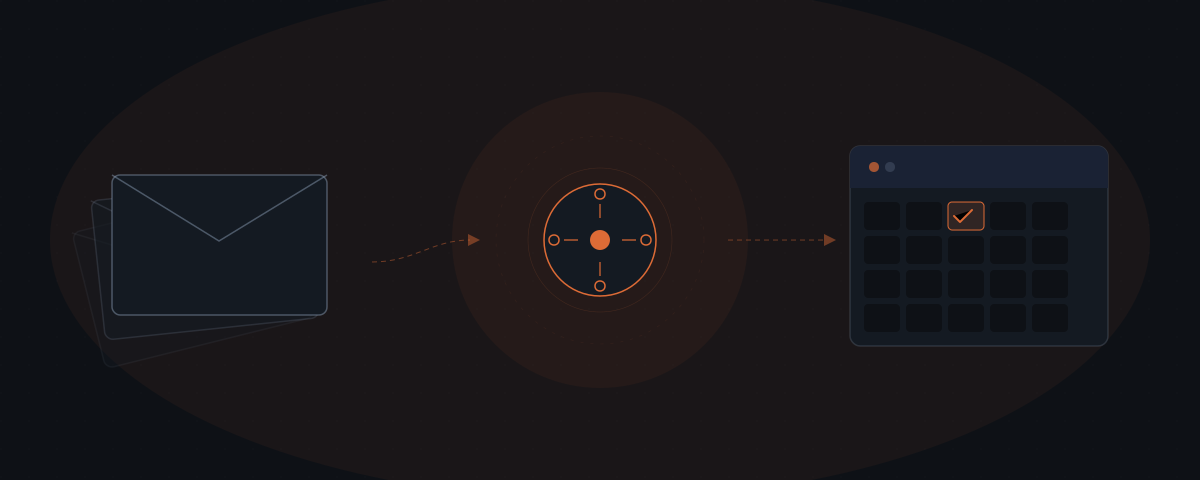
An AI agent for scheduling does more than block calendar time. The scheduling problem in a service business is the email negotiation loop — the back-and-forth required to agree on a time, confirm it, and update the relevant records. Research from Calendly puts the average at 7.3 emails per meeting. An agent reads the conversation, identifies that a meeting is needed, proposes a time, handles the response, and updates the CRM — without being prompted. The founder or account manager approves the final confirmation before it sends.
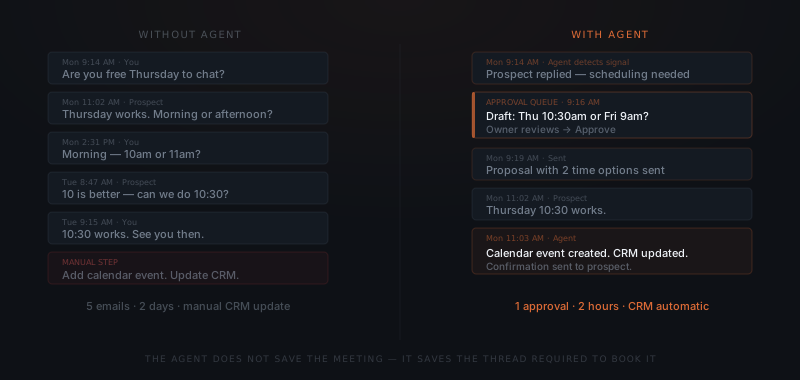
A new prospect replies to an outreach email: interested, want to talk. The next thirty minutes are email: do you have time Thursday? I'm free Thursday afternoon or Friday morning. Friday 10am? Actually 10 works better for me, can we do 10:30? Confirmed, see you then. Research from Calendly puts the average at 7.3 emails to schedule a single meeting — and for group meetings, Doodle's data shows the number can reach 30 emails and more than 30 minutes of coordination time.[¹][²] The meeting is 30 minutes. The scheduling can cost as much again in friction. That friction is the problem an AI agent for scheduling removes.
What a scheduling agent does that a calendar link cannot
Calendly and similar tools solve the slot-selection problem. A prospect receives a link, sees available times, and picks one. Scheduling becomes a self-service action. But Calendly requires the human to remember to send the link, to send it at the right moment, and to follow up when the prospect does not book.
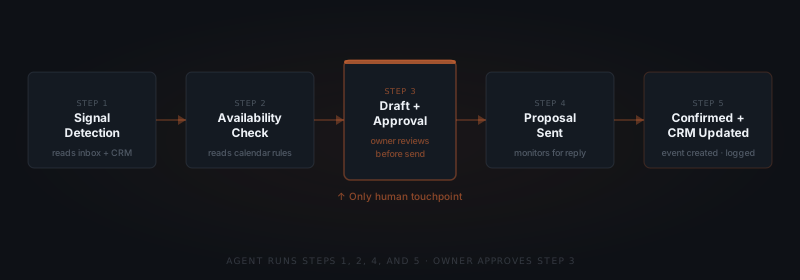
A scheduling AI agent handles the full loop. The agent monitors the inbox for signals that a meeting is needed — a positive response to outreach, a request to connect, a follow-up that mentions availability. The agent identifies the signal, checks the owner's calendar for available slots, drafts a proposal, and queues it for approval. Once approved, the agent sends the proposal and monitors for the response. When the prospect confirms, the agent updates the calendar, sends the confirmation, and logs the meeting in the CRM.
The difference is initiative. Calendly waits to be used. An agent watches for the moment it should act and acts without being told.
The business case for removing this friction is significant. The London School of Economics estimates that unproductive meetings — including the overhead of scheduling them — cost US businesses $259 billion annually.[³] Not all of that is recoverable through automation, but for service businesses where the founder or account managers manage 20–40 active relationships simultaneously, scheduling overhead is a measurable, addressable cost.
A scheduling AI agent does not replace the calendar link — it replaces the emails that precede it. The agent identifies the moment a meeting is warranted, proposes the time, and handles the response. The founder approves before anything sends.
How a scheduling agent works through the full cycle
A scheduling agent in a service business runs across four stages.
Signal detection. The agent monitors the inbox and CRM for scheduling signals: a prospect replies positively to outreach, a client requests a quarterly review, a partner asks to connect. Detection criteria are defined during setup — the agent does not guess.
Availability check. The agent reads the owner's calendar and identifies slots that meet the configured rules: minimum buffer between meetings, no Friday afternoons, prefer morning slots for prospect calls. The agent selects the two or three best options from the available window.
Draft and approval. The agent drafts a short scheduling message referencing the conversation context — "following up on your note about Q3 planning" — and attaches the proposed times. The draft goes to the owner's approval queue. The owner approves, edits, or dismisses.
Confirmation and logging. When the prospect replies with a confirmed time, the agent creates the calendar event, sends the confirmation email, and logs the meeting in the CRM with the relevant contact, stage, and meeting type. The owner sees the confirmed meeting in their calendar — without having touched the scheduling thread.
What the agent handles and what still needs a human
A scheduling agent handles the mechanics. The owner handles the judgment.
Agent handles: Detecting the scheduling signal. Checking calendar availability. Drafting the proposal with context. Sending the approved proposal. Processing the confirmation. Creating the calendar event. Logging in the CRM. Sending a reminder 24 hours before the meeting.
Owner reviews: The draft proposal before it sends. Any response that is ambiguous — "I might be able to do Thursday but let me check" requires a decision about whether to wait or offer a new time. Cancellations and reschedules where the reason changes how to respond.
The approval step keeps the owner in control of every outbound message. Nothing confirms and nothing sends without review. For prospect calls in particular, the approval step catches tone mismatches — the agent drafts professionally but may miss context the owner has from a previous conversation.
The average employee now spends 11.3 hours per week in meetings, with executives averaging 23 hours.[³] For service business founders managing client and prospect relationships alongside delivery work, compressing the scheduling overhead — even partially — is a direct return on meeting time.
Which scheduling workflows get the most from an agent
Scheduling agents perform best in businesses where the same scheduling pattern repeats across a high volume of contacts.
Prospect call booking. A consistent outreach sequence produces a predictable signal: positive reply, request to talk. The agent handles every booking from that point, across all active prospects simultaneously. An account manager running 30 active prospects at once eliminates the scheduling overhead entirely.
Client check-in scheduling. Monthly or quarterly reviews with a fixed client roster are scheduled repeatedly on the same cadence. The agent initiates the scheduling cycle for each client at the right point in the calendar, handles the back-and-forth, and fills the owner's calendar without prompting.
Vendor and partner coordination. Calls with suppliers, partners, and contractors follow a similar pattern to prospect calls. The agent handles the scheduling loop for every external relationship in the same way, at any volume.
The scheduling workflows where agents produce the highest return:
| Workflow type | Signal trigger | Typical volume | What the agent handles |
|---|---|---|---|
| Prospect call booking | Positive reply to outreach, "let's talk" message | 5–20 per week for active pipelines | Full loop: propose slots, process reply, create event, log in CRM |
| Client quarterly review | Calendar interval (60–90 days after last meeting) | Monthly per client roster | Initiation, back-and-forth, confirmation, 24-hour reminder |
| Project kickoff scheduling | CRM stage change (deal won → onboarding) | Once per new engagement | Coordinate all attendees, confirm slots, send invites |
| Vendor and partner sync | Partner contact list + time interval | Monthly or as needed | Same as prospect call, at any volume |
| Internal recurring meetings | Recurring schedule trigger | Weekly or biweekly | Slot check, draft invite, send on approval |
The problem isn't finding a slot. It's the seven emails it takes to confirm one.
For a framework on identifying which workflows in your business are ready for an agent, see how to know if a business process is ready to hand to an AI agent. For the other side of the decision, see what AI agents are actually bad at.
Integrations a scheduling agent connects to
The agent needs read access to calendar availability, inbox threads, and CRM records — and write access to create confirmed events and log activity.
| Platform | Role in the workflow | Access required |
|---|---|---|
| Google Calendar | Availability check and confirmed event creation | Read availability, write confirmed events |
| Outlook / Microsoft 365 Calendar | Availability check and confirmed event creation | Read availability, write confirmed events |
| Gmail | Signal detection in inbox threads, proposal send from real address | Read threads for signals; send on owner approval |
| Outlook Mail | Signal detection and proposal send | Read threads; send on owner approval |
| HubSpot | Activity logging, deal stage monitoring | Native API — log meeting created, update contact record |
| Salesforce | Opportunity and contact tracking | API — log meeting activity, update stage |
| Pipedrive | Deal and contact activity | API — log meeting and update last-contact date |
| Zoom / Google Meet | Meeting link generation for confirmed events | API — create room link, attach to calendar event |
| Slack | Approval notification — draft routed to founder for review | Webhook — draft with approve and dismiss buttons |
The minimum viable integration is calendar + primary inbox + CRM. These three give the agent availability data (calendar), the scheduling signal (inbox), and the activity log destination (CRM). Zoom or Meet integration is additive — useful for remote-first businesses but not required for the scheduling loop to work.
How to configure a scheduling agent
Define detection criteria
List the inbox and CRM signals that indicate a meeting is needed: positive reply to outreach, messages containing phrases like "let's connect" or "available for a call," CRM stage changes to "demo requested." The more precisely detection criteria are defined, the fewer false positives the agent generates. Start narrow and expand after the first week.
Set availability rules
Define the rules governing which slots the agent proposes: minimum buffer between meetings, days or windows unavailable for booking, maximum meetings per day, and slot preferences by meeting type (morning for prospect calls, flexible for client reviews). Rules are set once and apply to every scheduling request the agent handles.
Write draft templates by meeting type
Create a base template for each meeting type: prospect call, client review, partner sync. Templates set consistent tone and structure. The agent personalises using conversation context — the contact's name, the topic from the last message, and the company name from the CRM record.
Connect calendar, inbox, and CRM
Connect Google Calendar or Outlook for availability and event creation. Connect Gmail or Outlook Mail for signal detection and proposal send. Connect HubSpot, Salesforce, or Pipedrive for activity logging. Grant read access to availability data and write access only to confirmed events and CRM activity entries.
Configure the approval workflow and non-response default
Route drafts to the owner via Slack, email, or a review interface. Set the response window per meeting type — typically 2 hours for outreach-triggered requests, one business day for internal scheduling. Configure the non-response default: draft expires and logs as unactioned. Never configure auto-send on timeout.
Where scheduling agent implementations fail
Four failure modes appear consistently across scheduling agent deployments.
Slot proposed that the owner has mentally blocked. A day is free on the calendar but the owner has an unwritten mental note about that afternoon. The agent proposes it. The owner approves without catching the conflict. Prevention: keep informal blocks in the calendar, not only in memory. If it matters, it belongs in the calendar.
Ambiguous signal misidentified as a scheduling request. A prospect replies "I'll be in touch when ready" — not a scheduling signal, but it matches a keyword trigger. The agent drafts an unsolicited meeting proposal. The owner dismisses it, but the false positive adds queue noise. After the first week, review which signals triggered false positives and tighten the detection criteria.
Agent drafts for a contact already in a meeting thread. The agent monitors the primary inbox but the prospect already confirmed a meeting through a secondary email address or a forwarded thread. The agent treats the contact as unscheduled and drafts a second proposal. Scope the agent's inbox access to include all relevant email addresses, or check the CRM for existing scheduled meetings before drafting.
Timezone not captured from the prospect. The agent proposes slots in the owner's timezone. The prospect is three timezones away and accepts a slot that lands at 6am for them. Include timezone detection in the signal-detection logic — most email headers and calendar apps expose timezone data that the agent can read and use when drafting.
Frequently asked questions
What does an AI agent for scheduling do? An AI agent for scheduling monitors the inbox and CRM for signals that a meeting is needed, checks calendar availability, drafts a meeting proposal with conversation context, queues it for owner approval, and handles the confirmation when the recipient responds. The owner approves before anything sends. The agent creates the calendar event and logs the meeting in the CRM without further input.
How is a scheduling AI agent different from Calendly? Calendly is a self-service tool — it gives a prospect your availability and asks them to book. A scheduling agent is proactive — it detects the moment a meeting is needed, initiates the scheduling process, drafts the proposal, and handles the response. Calendly requires the human to remember to send the link. The agent watches for the signal and acts without being prompted.
What scheduling tasks still require a human? Ambiguous responses where the right action depends on relationship context. Cancellations where the reason changes how to respond. Any scheduling thread where tone or history makes a templated approach inappropriate. The agent handles the mechanics. The owner handles the judgment calls.
How long does it take to set up a scheduling agent? For a standard service business with one calendar, a CRM, and a primary inbox, setup takes 3–5 days. The configuration covers detection criteria, scheduling rules, draft templates, and the approval workflow. The agent starts running on live scheduling requests from day one of go-live.