Friday afternoon. The project manager pulls Asana for task status, checks Slack for blockers, opens the spreadsheet for budget tracking, and spends two hours writing a status report that goes to six people who will skim it in thirty seconds. The same ritual happens next Friday. And the Friday after that. An AI agent handles this layer — collecting updates from connected project tools, identifying blockers, assembling the report draft, and queuing it for approval — so the PM's time goes to the decisions the report describes, not the assembly of it.
Friday afternoon. The project manager pulls Asana for task status, checks Slack for blockers, opens the spreadsheet for budget tracking, and spends two hours writing a status report that goes to six people who will skim it in thirty seconds. The same ritual happens next Friday. And the Friday after that. An AI agent handles this layer — collecting updates from connected project tools, identifying blockers, assembling the report draft, and queuing it for approval — so the PM's time goes to the decisions the report describes, not the assembly of it.
Where project management time disappears
Project managers don't spend most of their time managing projects. They spend most of their time generating evidence that projects are being managed.
45% of project managers spend more than one day per week manually assembling and distributing status reports.[¹] A separate Asana study found that knowledge workers spend 60% of their time on "work about work" — status updates, unnecessary meetings, and context-switching between tools — leaving only 40% for the skilled work they were actually hired to do.[²]
The math compounds on teams managing multiple projects simultaneously. A project manager running four client engagements in parallel produces four status reports every week. Each report requires pulling data from Asana or Monday.com, checking Slack for in-progress conversations about blockers, reviewing the budget tracker, and formatting it into the template the client expects. Four reports × two hours each = eight hours of a forty-hour week on document assembly.
That eight hours does not include the follow-up messages when team members haven't updated their tasks, the reminder emails when milestones are approaching, or the stakeholder questions that arrive after the report goes out because something wasn't clearly explained in the summary.
| Status reporting task | Time per report | Projects managed | Total weekly cost |
|---|---|---|---|
| Task status pull from PM tool | 30 min | 4 | 2 hours |
| Blocker identification (Slack/email) | 30 min | 4 | 2 hours |
| Report writing and formatting | 45 min | 4 | 3 hours |
| Stakeholder distribution | 15 min | 4 | 1 hour |
| Total | 2 hours | 4 | 8 hours |
Eight hours per week is a full day. That day is not spent on scope decisions, client relationships, risk management, or the judgment calls that determine whether projects succeed. It is spent assembling evidence that the PM already has in their head.
What an AI agent handles in project coordination
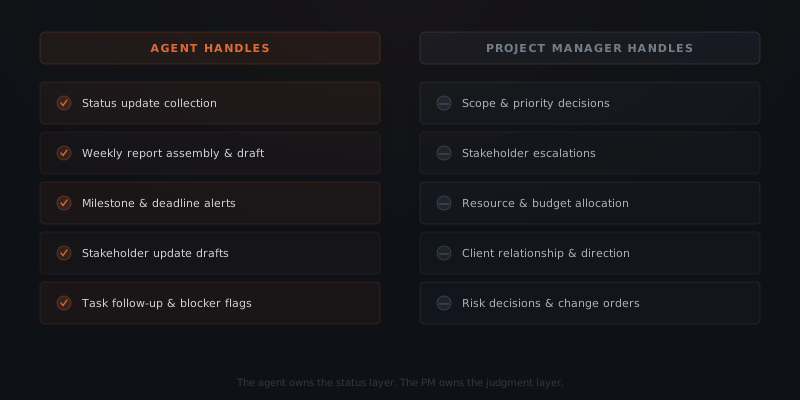
An AI agent for project management — one application of what an AI agent is more generally — handles the status layer — the collection, assembly, and distribution of project information. The agent reads from connected project tools, identifies what needs attention, and drafts the appropriate communication. The project manager reviews and approves before anything goes to stakeholders.
Status report assembly is the most direct application. The agent reads task completion data from Asana, Monday.com, Notion, or ClickUp; identifies overdue tasks and upcoming milestones; checks for flagged blockers in the connected project record; and assembles a formatted status report draft. The PM opens the draft, adds context where needed, and approves with one click. The report sends from the PM's name and email.
Milestone and deadline alerts run automatically without a manual calendar review. The agent reads milestone dates from the project tool, calculates lead time, and sends alerts to the PM and relevant team members at defined intervals — typically 7 days out and 2 days out. Milestones that are at risk based on current task completion rates get flagged before the due date, not after.
Stakeholder update drafts adapt to different audiences. The same project data produces an internal team status (task-level detail, blocker specifics, resource notes) and a client-facing summary (milestone progress, deliverables, next steps). The agent drafts both. The PM approves both. The formats are consistent week over week without the PM reformatting the same information twice.
Task follow-up messages handle the coordination work that falls through the gaps. When a task is overdue and the assigned team member hasn't updated it, the agent sends a short follow-up message: "Just checking in on [task] — scheduled for completion by [date]. Any blockers or updates?" The PM doesn't chase individually. The agent runs the follow-up layer.
An AI agent handles the status collection, report assembly, and stakeholder communication layer. An AI agent doesn't set project scope, make resource allocation decisions, resolve client conflicts, or determine how to respond to a missed milestone. Those decisions stay with the project manager. The agent removes the information-gathering overhead so the PM can focus on the decisions.
The status meeting problem and what replaces it
Status meetings exist because status reports don't exist. The agent removes the meeting by making the report automatic.
Most project teams run a weekly status meeting. The agenda is consistent: what did each person complete last week, what is each person working on this week, and what is blocked. The output of that meeting is information the project manager then writes into a report that goes to stakeholders who weren't in the meeting.
The meeting exists because there is no reliable alternative for gathering that information. Team members don't consistently update their project management tools. Status reports require manual data pulls that aren't worth doing daily. The meeting fills the information gap.
An AI agent closes the gap without the meeting. The agent reads project tool updates daily, detects completion events and new blockers automatically, and builds the weekly picture from recorded activity rather than verbal recaps. Team members whose task status is unclear receive a direct follow-up from the agent — "just confirming [task] status for this week's report." The data arrives in the report rather than in a 45-minute meeting.
Companies using AI-driven project management tools deliver 61% of their projects on time, compared to 47% for teams not using AI tools.[³] The improvement comes primarily from earlier visibility into blockers and at-risk milestones — which is exactly what automated status collection provides. The PM sees a risk two weeks before the deadline rather than at the deadline.
This changes what the project manager spends time on. Instead of assembling information, the PM interprets it. Instead of writing the report, the PM edits it. Instead of scheduling status meetings to gather updates, the PM uses the updates the agent already collected to make better decisions.
How the agent connects to project management tools
Project management operations typically run across three to five tool categories: a task management platform, a communication tool, a document system, a time tracking tool, and client communication channels. An AI agent connects to the existing stack.
| Tool category | Common platforms | What the agent reads or writes |
|---|---|---|
| Task management | Asana, Monday.com, ClickUp, Jira, Notion | Reads task status, milestone dates, assignees, completion |
| Communication | Slack, Microsoft Teams, email | Reads blocker flags, sends status updates and alerts |
| Documents | Google Drive, Notion, Confluence | Reads project documentation, writes report drafts |
| Time tracking | Harvest, Toggl, Clockify | Reads hours logged, compares to budget |
| Client communication | Gmail, Outlook, client portal | Sends approved stakeholder updates |
The integration scope depends on what the team already uses. A team on Asana + Slack + Google Drive can go live in two to three weeks. The agent reads task data from Asana, checks Slack for flagged blockers, pulls hours from Google Sheets or Harvest, and assembles the draft in a Google Doc for PM review. The PM approves and the report sends.
Teams running Jira and Confluence for technical project tracking add those integrations. The underlying process is the same: read the data where it lives, assemble the report, get approval, distribute.
See how to know if a business process is ready to hand to an AI agent for a framework on evaluating which coordination workflows are ready for automation.
What a project management agent handles across an agency
For an agency managing multiple client engagements simultaneously, the agent becomes the coordination layer across the entire portfolio — not just one project.
The agent reads status from all active projects each week. Projects approaching milestone dates get flagged in the summary. Projects with overdue tasks generate follow-up messages to the relevant team members. Projects that completed work this week get delivery confirmation drafted for the client.
A single PM reviewing four client reports previously spent eight hours on weekly reporting. With an agent running the collection and assembly, that review drops to under an hour: open the queue, review four drafts, edit where needed, approve and send. The PM's calendar clears for client calls, scope planning, and the work that actually requires their expertise.
The scale advantage compounds. A PM managing six projects without an agent cannot effectively cover the coordination layer across all six — something gets dropped, a milestone reminder doesn't go out, a client doesn't hear from the team for two weeks. A PM with an agent running the coordination layer manages six projects with the same attention to detail as two projects managed manually.
See which workflows to automate first for a framework on sequencing agent implementations across a multi-project operation.
What goes live first and how long it takes
Scoping
Map the current status reporting process — which tools the team uses, what the weekly report contains, who receives which version. Identify the primary project management platform and confirm API availability.
Integration
Connect the agent to the task management platform (Asana, Monday.com, ClickUp, or Jira), communication tool (Slack or Teams), and document system (Google Drive or Notion). Map the data fields the agent reads for each project.
Report template
Define the status report format — sections, fields, and audience. The PM reviews the template and confirms it matches what stakeholders currently receive. Internal and client-facing versions are templated separately.
Approval workflow
Set the review flow. Each Friday (or whichever day reports go out), the PM receives a draft for each active project. The PM reviews, edits, and approves from a single interface. Approved reports send immediately.
Go-live
The first project's status report goes live. The agent generates the first draft. The PM compares it to what they would have written manually, adjusts the template where needed, and approves. After two to three cycles, the drafts require minimal editing.
A standard implementation covering weekly status reports and milestone alerts for a four-project portfolio goes from scoping call to first live report in two to three weeks. Task follow-up automation and stakeholder-specific report variations are typically added in the following weeks.
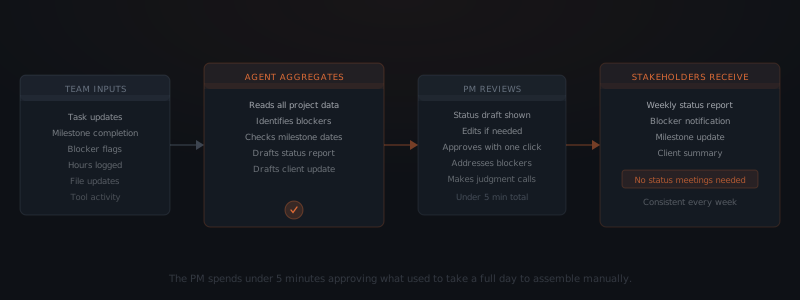
The time recovery becomes concrete in the first week. The PM who previously spent Friday afternoon assembling reports now spends thirty minutes reviewing drafts. The eight hours that status assembly consumed are available for the work that has been waiting.
30% of administrative project work can be eliminated through AI-driven automation, according to project management research tracking the category.[⁴] For project managers at agencies and consultancies — where billable hours are the revenue model — recovering 20–30% of weekly hours from administrative overhead has a direct impact on capacity and margin.
Where the agent stops and a person takes over
Every alert and follow-up in this workflow fires from a defined trigger — a milestone date, an overdue task, a scheduled report day — which is why the agent can send some of them directly without a PM approving each one individually. Stakeholder-facing communication is different: every report and update still routes through the PM's review before it reaches a client or a stakeholder outside the team. Either way, the agent is scoped to recognize when a routine trigger has turned into something that needs a PM's judgment, not just a send.
| Workflow | Runs automatically | Escalates to staff |
|---|---|---|
| Milestone & deadline alerts | 7-day and 2-day alerts sent directly to the PM and relevant team members | Milestone is at risk in a way that changes the delivery date or requires a client conversation |
| Task follow-up messages | Sent directly to the assigned team member when a task goes overdue | Same task misses two follow-ups running, or the reply names a blocker the agent can't resolve on its own |
| Status report assembly | Draft compiled weekly from connected tool data, queued for PM review | Report reveals a missed milestone, budget overrun, or scope risk that needs interpretation before it goes out |
| Stakeholder update drafts | Internal and client-facing versions assembled from the same data, queued for approval | Client-facing draft touches a scope change, pricing, or a commitment the PM hasn't made yet |
| Portfolio-wide flagging | Projects nearing milestones or carrying overdue tasks flagged across the full portfolio | A resource conflict surfaces across projects — the same person needed on two engagements at once |
Scope changes, resource allocation, client escalations, and change orders are never the agent's call — those route to the PM, with the report draft and task history attached. The agent's job across every one of these paths is the same: recognize when a routine trigger has become a decision, stop, and hand it to the PM instead of drafting past it.
Frequently asked questions
How can an AI agent help with project management? An AI agent helps with project management by handling the status reporting and communication layer — collecting updates from connected project tools, identifying overdue tasks and blocked items, assembling the weekly status report draft, and distributing stakeholder updates once the project manager approves. Project managers using agent workflows recover 4–8 hours per week previously spent on manual status collection and report writing, returning that time to decision-making, client relationships, and scope management.
What project management tasks can an AI agent automate? An AI agent automates weekly status report assembly, milestone and deadline alerts, stakeholder update drafts, task follow-up messages for overdue items, blocker escalation flagging, and meeting summary distribution. Tasks requiring human judgment — scope changes, resource allocation decisions, client escalations, and risk management calls — remain with the project manager. The agent handles the coordination and communication layer; the PM handles the decisions.
How does a project management AI agent connect to tools like Asana or Monday? A project management AI agent connects to Asana, Monday.com, Notion, ClickUp, Jira, and Google Workspace through standard API integrations. The agent reads task status, milestone completion, assigned owners, and due dates. It writes status updates, sends draft reports to the project manager for approval, and logs communication back into the project record. No migration to a new project management tool is required.
What does a project management AI agent implementation cost? A standard implementation covering status report assembly, milestone alerts, and stakeholder updates typically runs $2,000–$4,000 for the initial build, depending on the number of project management tools and stakeholder distribution channels. Monthly operating costs run under $100 at typical project volumes. A project manager recovering one full day per week — at $50–$100 per hour equivalent — recovers implementation cost within the first month.
Notes
- Breeze, "Project Management Statistics and Trends for 2026." https://www.breeze.pm/articles/ai-project-management-statistics
- Asana, "Anatomy of Work Global Index." https://asana.com/work-management/anatomy-of-work
- Breeze, "AI Project Management Statistics and Trends." https://www.breeze.pm/blog/project-management-statistics
- Celoxis, "Top 10 Ways AI Is Transforming Project Management in 2026." https://www.celoxis.com/article/ai-transforming-project-management