An AI knowledge base answers questions from a company's own documents, and it still gets answers wrong. In a preregistered Stanford study published in May 2024, commercial legal research tools built on curated sources gave hallucinated answers to between 17% and 33% of test questions. Those figures cover three legal tools on 202 questions, not every product, but the failure points they expose apply to any assistant that answers from files: the right document is missing or out of date, the wrong passage is found, the answer goes beyond the source, or the tool shows someone a file they should not see. This page sets out each failure point with dated evidence and a test to run before staff or customers rely on the answers.
An AI knowledge base is an assistant that answers questions from your company's own documents: handbooks, contracts, project files, product sheets and policies. It searches the files when a question arrives and writes an answer from what it finds.
That design reduces made-up answers. It does not remove them. This page takes the dated evidence on where answers from documents go wrong and turns it into fixes and a test you can run before launch.
Does an AI knowledge base give correct answers from your documents?
Not reliably. The best dated measurement is Stanford's 2024 study of commercial legal research tools that answer from curated sources: Lexis+ AI, Westlaw AI-Assisted Research and Ask Practical Law AI "each hallucinate between 17% and 33% of the time" on 202 preregistered questions, published 30 May 2024.[¹] The best of them, Lexis+ AI, answered 65% of questions correctly and with a supporting source.[¹]
Those tools were sold on the promise that answering from documents fixes the problem. The study quotes the vendors' own claims of "eliminating" hallucinations and "hallucination-free" citations.[¹] The tools did hallucinate less than GPT-4 used on its own. They did not stop.
The study covers legal research, three products and one point in time. It is not an error rate for your knowledge base. It is evidence that the method, on its own, does not guarantee correct answers, even when a large company curates the sources.
The technique behind most knowledge bases is called retrieval-augmented generation: search the documents, hand the passages found to the AI, and let it write the answer. Each of those three steps can go wrong in its own way.
Why does an AI answer wrongly from your own documents?
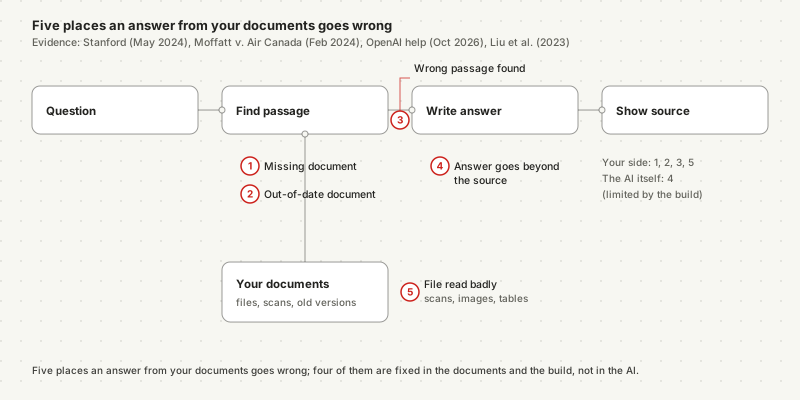
Answers from documents go wrong at five points, and four of them sit on the company's side of the system. The Stanford study, the Air Canada tribunal decision of 14 February 2024 and OpenAI's published file limits, updated October 2026, each show one of these points in a real product.[¹][²][⁵]
| Failure point | What happens | Dated evidence |
|---|---|---|
| The document is missing | No file holds the answer, and the AI guesses instead of saying so | Stanford separated refusals and unsupported answers from wrong ones: Ask Practical Law AI gave one or the other on more than 60% of questions in 2024[¹] |
| The document is out of date or contradicts another | Two sources disagree and the AI picks the wrong one | Air Canada's chatbot contradicted Air Canada's own policy page (2024)[²] |
| The wrong passage is found | The search returns a near-miss, and the answer is built on it | Models used information in the middle of long input less reliably (2023 study)[⁴] |
| The answer goes beyond the source | The AI adds a claim the passage does not make | Stanford counts responses that "falsely assert a source supports a statement" as hallucinations[¹] |
| The file is read badly | Scans, images and tables lose their content on the way in | Outside ChatGPT Enterprise, ChatGPT reads only a file's digital text, not its embedded images (October 2026)[⁵] |
The first two are document problems: fix them before launch. The third depends on the build, which decides how passages are found. The fourth is the AI's own failure; the build can only limit it, by requiring "I don't know" when nothing matches. The fifth is covered in our guide to what AI can and cannot read from your documents.
Does a citation prove the answer is right?
No. A citation shows where the AI looked, not whether it read the source correctly. Stanford's 2024 study counts answers that "falsely assert a source supports a statement" as hallucinations, and in Moffatt v. Air Canada, decided on 14 February 2024, the airline's chatbot linked to the very page that contradicted its answer.[¹][²]
The Air Canada facts are specific. The chatbot told a customer he could apply for a bereavement fare after travelling, "within 90 days of the date your ticket was issued". The words "bereavement fares" in that answer were a link to Air Canada's "Bereavement travel" page. That page said the reduced fare does not apply once travel is completed.[²]
Air Canada's chatbot linked to the policy page that proved its answer wrong. A citation is a place to check, not a check.
For a knowledge base, that changes what "shows its sources" is worth. Sources make checking possible. They only help when someone checks, which is why the test further down includes opening every cited passage for a sample of answers.
The tribunal also rejected Air Canada's defence that the chatbot was responsible for its own words: "It makes no difference whether the information comes from a static page or a chatbot."[²]
Can an AI knowledge base show staff documents they should not see?
Yes. An AI knowledge base can show any document its account can read, and it makes over-shared files easy to find. Microsoft states that Copilot "only surfaces organizational data to which individual users have at least view permissions", and its Copilot deployment blueprint, updated 18 August 2026, begins with the step "Remediate oversharing".[⁶][⁷]
A knowledge base answers from everything its account can read. If it reads your files through one shared account, every person who can ask it a question can reach every document behind it.
There are two separate problems here. The first is the build: a knowledge base that indexes the whole drive with an administrator's access answers everyone with administrator's knowledge. The second is the files: a salary sheet shared with "everyone in the company" years ago was hard to find before. A search that reads every file finds it in seconds.
Microsoft's guidance treats the second problem as the first job before switching Copilot on: identify high-risk sites and files, restrict access where needed, then fix the sharing.[⁷] Our guide to Microsoft Copilot under the GDPR covers what that means for data protection.
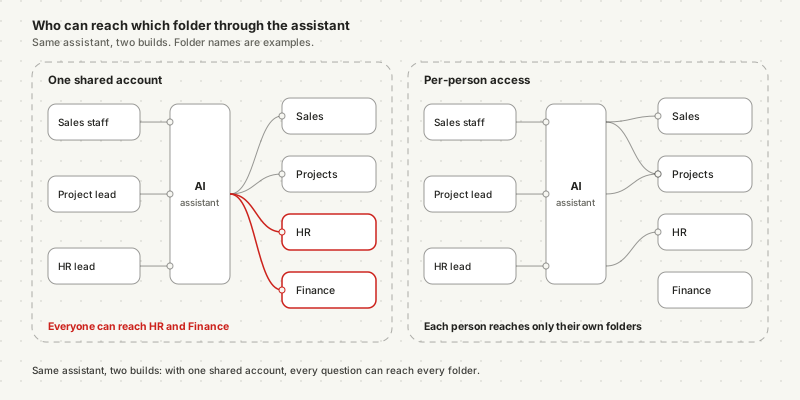
The right build passes each person's own permissions through to the search. Our explainer on what an AI agent can access in Gmail, Drive, Slack and Microsoft 365 shows how those permissions are granted.
What limits do ChatGPT and Copilot set on company documents?
Off-the-shelf assistants cap how many documents a knowledge base can hold and how those files are read. OpenAI's help page, updated in October 2026, allows up to 40 files per project on ChatGPT Business and up to 10 knowledge files per custom GPT "for the lifetime of that GPT".[⁵]
| Tool and plan | Documents it can hold | How files are read | Source |
|---|---|---|---|
| ChatGPT projects (Business, Enterprise, Pro, Edu) | Up to 40 files per project | Text only outside Enterprise | OpenAI, October 2026[⁵] |
| Custom GPT knowledge | Up to 10 files, for the GPT's lifetime | Text only outside Enterprise | OpenAI, October 2026[⁵] |
| ChatGPT, any file | 2 million tokens per text or document file | Enterprise adds visual retrieval for PDFs | OpenAI, October 2026[⁵] |
| Microsoft Copilot | Whatever the user can open in Microsoft 365 | Through Microsoft 365 permissions | Microsoft, updated October 2026[⁶] |
Forty files is a project folder, not a company handbook plus every contract. A company with a few hundred documents outgrows a ChatGPT project quickly and starts choosing which files to leave out, which brings back the missing-document failure.
Size of input matters too. The 2023 "Lost in the Middle" study found that language models used information "at the beginning or end of the input context" more reliably than information in the middle of long inputs.[⁴] The study measured 2023 models, but its finding is one reason a good build sends the AI a few relevant passages, not the whole folder.
What should you fix in your documents before launch?
Fix the documents first, because a knowledge base repeats whatever they say. The Air Canada case of 14 February 2024 turned on two company pages that disagreed; the tribunal held the company responsible for both.[²] Four fixes cover most of the risk:
- One current version per topic. Archive old price lists, expired policies and superseded templates outside the folders the knowledge base reads.
- An owner and a date on each document. When an answer is wrong, someone needs to know which file to correct and when it was last checked.
- A written scope. Decide which questions the knowledge base may answer — internal HR policy, product specifications, project history — and which it must refuse, such as legal or medical advice.
- Clean sharing. Remove "everyone" links on sensitive folders before connecting anything, as Microsoft's own Copilot blueprint recommends.[⁷]
None of these needs the AI. They are the same work a new employee would need to find the right answer, done once and kept up.
Documents that were scanned or photographed need one more step: check that their text can be read at all, or the search will never find what they say.
How do you test an AI knowledge base before launch?
Test it with real questions, including ones your documents cannot answer, before anyone relies on it. The Stanford team built its 2024 evaluation the same way: a fixed, preregistered set of questions and a written definition of what counts as a wrong answer.[¹] The steps below are our method, built from that evidence; they are not an industry standard.
Collect real questions
Add questions the files cannot answer
Check every source on a sample
Plant an outdated document
Run a two-person permission test
Repeat after every change
The one-page checklist holds these six steps and the document fixes above: Download the AI knowledge base test checklist (PDF).
Should customers get answers from it directly?
Only after the internal test passes and with a person reviewing what goes out where the stakes are high. Two public cases show the cost: Air Canada was ordered on 14 February 2024 to pay C$812.02 over a chatbot answer, and New York City's MyCity chatbot told businesses in March 2024 they could refuse cash, against a 2020 city law.[²][³]
New York's chatbot ran on Microsoft's Azure AI services and was announced as drawing on "more than 2,000 NYC Business web pages".[³] Official sources did not stop it from giving advice that broke the city's own rules. The city called it a pilot that would improve.[³]
Customer-facing answers change the risk in two ways. A wrong internal answer reaches a colleague who may notice. A wrong answer to a customer is a statement by the company, as the Air Canada tribunal found.[²] And customers cannot tell a current source from an old one.
A custom agent built for this job answers each person only from documents they may open, shows the passage behind every answer, and holds customer-facing replies for approval before they are sent where the stakes justify it. When a wrong answer does get through, our guide on what to do when an AI agent makes a mistake covers the response.
Frequently asked questions
How accurate is an AI knowledge base? There is no single figure. The best dated measurement is a 2024 Stanford study of three commercial legal research tools that answer from curated sources: they hallucinated on 17% to 33% of 202 test questions, and the best tool answered 65% accurately. Accuracy for a company knowledge base depends on how current and complete its documents are and on how it is tested before launch.
Do I need to train an AI model on my company documents? Usually not. Most AI knowledge bases leave the model unchanged and search your documents at the moment a question is asked, then write an answer from the passages found. This is called retrieval-augmented generation. It means a corrected document changes the next answer without retraining, but it also means the answer is only as good as the passage the search finds.
Can an AI knowledge base show employees files they are not allowed to see? Yes, if it reads documents with one shared account or if files are already shared too widely. Microsoft says Copilot only surfaces data a user already has permission to view, and its Copilot deployment blueprint, updated August 2026, starts with remediating oversharing. A knowledge base should answer each person only from documents that person may open.
Is a company liable for wrong answers from its AI chatbot? A tribunal has held a company responsible. In Moffatt v. Air Canada, decided on 14 February 2024, a British Columbia tribunal rejected the argument that the chatbot was responsible for its own answers and ordered Air Canada to pay C$812.02. That is a Canadian decision, not European law; ask a lawyer about your own situation.
Notes
- Magesh, Surani, Dahl, Suzgun, Manning and Ho, Hallucination-Free? Assessing the Reliability of Leading AI Legal Research Tools, arXiv:2405.20362, May 30, 2024, accessed October 13, 2026. Used for the 17–33% hallucination range, 65% accuracy for Lexis+ AI, incomplete answers over 60% for Ask Practical Law AI, the vendors' claims, and the definition of a hallucinated response.
- Civil Resolution Tribunal of British Columbia, Moffatt v. Air Canada, 2024 BCCRT 149, February 14, 2024, paragraphs 15–17, 27, 28 and 44, accessed October 13, 2026.
- The Markup, NYC's AI chatbot tells businesses to break the law, Colin Lecher, March 29, 2024, accessed October 13, 2026.
- Liu et al., Lost in the Middle: How Language Models Use Long Contexts, arXiv:2307.03172 v3, November 20, 2023, Transactions of the Association for Computational Linguistics, accessed October 13, 2026.
- OpenAI Help Center, Uploading files and audio to ChatGPT, updated October 2026, accessed October 13, 2026. Used for project and GPT file limits, the per-file token cap and text-only retrieval outside Enterprise.
- Microsoft Learn, Data, Privacy, and Security for Microsoft Copilot, updated October 8, 2026, accessed October 12, 2026.
- Microsoft Learn, Secure & Governed Data Foundation for Microsoft Copilot, May 6, 2026, updated August 18, 2026, accessed October 13, 2026.