For businesses on Microsoft 365 deciding whether to build an agent in Copilot Studio or have a custom agent built, this guide explains how Copilot Studio is priced, what it does well, where it stops, and how to choose.
What you'll learn
- How Copilot Credits, credit packs and pay-as-you-go billing work
- What a Microsoft 365 Copilot licence covers for agents
- What Microsoft's own example agents cost per month
- What happens when an agent runs out of credits
- The documented limits on files, questions and data location
- Four questions that decide between Copilot Studio and a custom agent
Microsoft Copilot Studio is Microsoft's tool for building agents that answer questions and carry out tasks inside Microsoft 365, Teams, a website or another channel. In October 2026 it billed each answer in Copilot Credits, from 1 credit for a scripted answer to 10 for searching across your company's Microsoft 365 data, at $200 for 25,000 credits a month, while staff holding a Microsoft 365 Copilot licence used internal agents at no extra charge. Who talks to the agent therefore decides most of the cost. This page turns Microsoft's published rates into monthly figures, collects the documented limits that matter to a small or mid-sized business, and sets out when a custom agent is the better fit.
Microsoft Copilot Studio is the tool Microsoft sells for building agents: assistants that answer questions from your documents and carry out steps in your systems. It runs on Microsoft 365, and the agents it builds can appear in Teams, on a website or in Microsoft's own Copilot.
Most businesses considering it already pay for Microsoft 365. The question is whether their agent belongs there or in a custom build. This page answers that with Microsoft's own prices and documentation.
What is Microsoft Copilot Studio?
Microsoft Copilot Studio is Microsoft's full tool for building agents for a department, a whole organisation or external customers, with multi-step workflows, approvals and connections to systems beyond Microsoft 365. As of October 2026, Microsoft offers a lighter tool beside it: Agent Builder, inside Microsoft 365 Copilot, for "Lightweight Q&A agents" used by one person or a small team.[5]
The two tools sit on one ladder. Agent Builder is where an employee builds a question-and-answer helper for their own team's SharePoint files in plain language. Copilot Studio is the separate web portal where a "maker" builds agents with branching logic, connectors to other systems, autonomous triggers and separate development, test and production environments.[5] An Agent Builder agent can be copied into Copilot Studio when it outgrows the simple version.[5] Agent Builder can also be used free of charge for agents that answer only from public web content, with no company data.[5]
Microsoft's own examples show the difference in scope. For Agent Builder: a project FAQ bot or an onboarding helper. For Copilot Studio: a customer support agent that opens tickets and escalates to a person, or a sales assistant that reads CRM data and starts an approval.[5] This page is about Copilot Studio, the tool for the second kind.
How much does Copilot Studio cost?
As of October 2026, Copilot Studio is billed in Copilot Credits: $200 a month for a pack of 25,000 credits, or $0.01 per credit on pay-as-you-go.[3][4] In Germany the pack cost €173.30 a month before VAT.[3] Each answer or action uses between 1 and 10 credits, and unused credits do not carry over to the next month.[1][2]
Microsoft charges by what the agent does, not by how many people use it:
| What the agent does | Credits | Pack price per event | Pay-as-you-go |
|---|---|---|---|
| Scripted answer written by the maker | 1 | $0.008 | $0.01 |
| AI-generated answer | 2 | $0.016 | $0.02 |
| Agent action (a step, a trigger, a reasoning step) | 5 | $0.04 | $0.05 |
| Search across your Microsoft 365 data ("tenant graph grounding") | 10 | $0.08 | $0.10 |
| Agent flow, per 100 actions | 13 | $0.104 | $0.13 |
| Voice, per minute (GenAI Voice) | 35 | $0.28 | $0.35 |
At the pack price one credit costs $0.008, which is $200 divided by 25,000; on pay-as-you-go it costs $0.01.[2][3][4] One question can use several rows at once. Microsoft's own example of an agent that searches company data uses 12 credits for one answer: 10 for the search and 2 for the answer.[2]
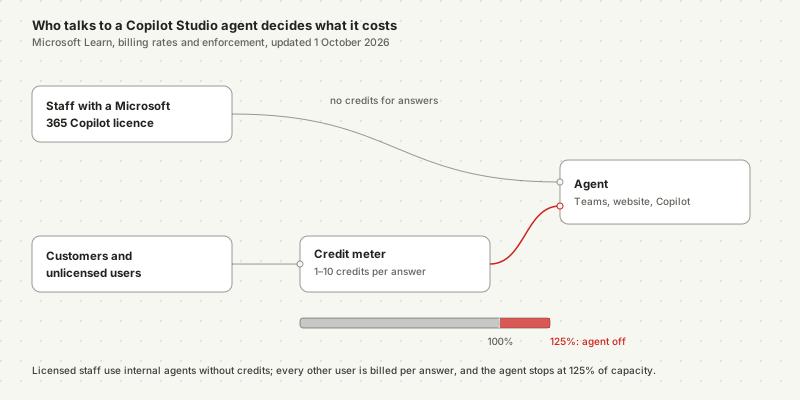
The licence changes everything for staff. A Microsoft 365 Copilot licence costs $30 per user a month on annual billing, or €26 before VAT in Germany.[3] Staff holding it can use agents in Copilot Chat, Teams and SharePoint without consuming credits for answers or company-data searches.[1][2] Microsoft's own billing table names the full Microsoft 365 Copilot licence. If you hold the smaller Copilot Business plan, confirm with Microsoft or your partner that the same applies.
Two more costs sit outside credits. "An Azure subscription is required to use agents", and a trial licence lets you build and test but not publish.[3][1]
What does a Copilot Studio agent cost per month?
A customer-facing agent costs real money and an internal one for licensed staff costs little. Microsoft's own example of a website support agent uses 7,200 credits a day. Over a 30-day month that is 216,000 credits: nine credit packs, $1,800, or $2,160 on pay-as-you-go.[2] An agent used only by licensed staff in Teams consumes no credits for its answers.[2]
Microsoft's billing page counts its three examples per day. Over a 30-day month they come to:
| Microsoft's example | Credits per day (Microsoft) | Credits per month (×30) | Monthly cost: packs / pay-as-you-go |
|---|---|---|---|
| Website support agent: 900 customers a day, four scripted and two AI answers each | 7,200 | 216,000 | 9 packs, $1,800 / $2,160 |
| Sales agent searching company data: 100 unlicensed staff a day, four AI answers and four searches each | 4,800 | 144,000 | 6 packs, $1,200 / $1,440 |
| Order agent: four actions for each new order | 20 per order | 18,000 at 30 orders a day | 1 pack, $200 / $180 |
The sales example also had 50 licensed staff, who cost nothing.[2] Their usage does not appear in the bill at all. That is the pattern: the same agent is nearly free for staff with Copilot licences and billed per answer for everyone else.
Microsoft's own example of a customer support agent uses 7,200 credits a day. Over a month that is nine credit packs, $1,800.
Packs are cheaper per credit but expire monthly. Pay-as-you-go costs 25% more per credit at list prices but bills only what you use.[3][4] Microsoft also sells a one-year prepurchase plan that "Save[s] up to 20%".[3] Microsoft publishes an agent usage estimator for your own figures.[2]
To estimate your own agent before building it, you need four numbers:
- Conversations per month, from your support inbox, phone log or helpdesk.
- Answers per conversation, by type. Scripted answers cost 1 credit, AI answers 2, searches across company data 10.[2]
- Actions per conversation, such as creating a ticket or starting a flow, at 5 credits each.[2]
- The share of users with a Microsoft 365 Copilot licence, whose internal use is not charged.[2]
Multiply the first three, take away the licensed share, and compare the result with a pack of 25,000 credits. If the figure swings by season, plan for the busiest month, because credits do not carry over.[1]
What happens when Copilot Studio credits run out?
Microsoft disables the agent. Under Microsoft's enforcement policy, when a tenant reaches 125% of its prepaid capacity, "Custom agents are disabled", and anyone who then tries to use one sees "There is a billing issue." or "This agent is currently unavailable. It has reached its usage limit."[2] Unused credits from quiet months do not carry over to busy ones.[1]
Microsoft allows overage up to that point, "similar to a grace period".[2] A conversation in progress finishes, and then the agent stops answering until capacity is added or the month resets.[2] Agent flows behave differently: when prepaid capacity is used up, new flow runs are blocked while the agent keeps answering.[2]
Microsoft documents two protections. An environment linked to an Azure pay-as-you-go meter is not disabled, because overage is billed instead.[2] And administrators can set monthly consumption limits for each agent in the Power Platform admin center.[2] A seasonal business should decide in advance which one it wants: a bill that grows in December, or an agent that stops.
What does Copilot Studio do well?
Copilot Studio is strongest for internal agents that answer from Microsoft 365 data for staff who already hold Copilot licences. Its agents respect existing Microsoft 365 permissions, appear in Teams and SharePoint, and are managed through Microsoft's admin centres.[5] For those staff, answers cost no credits.[2]
Five things work in its favour:
- Permissions you already manage. Agents built in Microsoft 365 do not see what a user cannot open. "If a user doesn't have access to a SharePoint site, Teams channel, or Outlook mailbox, the agent doesn't surface content from those sources."[5]
- Where staff already work. Agents appear in Teams, Copilot Chat and SharePoint, so nobody learns a new tool.
- Approvals and workflows. Copilot Studio supports "multi-step logic, approvals, and branching workflows" and connectors to systems beyond Microsoft 365.[5] Our guide to approval workflows in an AI agent system covers what a good approval step needs.
- Governance. Separate development, test and production environments, data loss prevention policies and audit logs come with the platform.[5]
- No new vendor. Your processing terms, billing and admin stay with Microsoft.
For a business where every employee has a Copilot licence and the agent answers questions from SharePoint, Copilot Studio is usually the right first choice. The cost is the maker's time, not the credits.
What are the limitations of Copilot Studio?
As of October 2026, Microsoft's own limits page lists restrictions on file sizes, the kind of questions agents can answer, request rates and labelled documents. Without a Microsoft 365 Copilot licence in the tenant, AI answers from SharePoint only use files "under 7 MB", and agents cannot answer a question that names a file.[6]
These are the limits most likely to affect a small or mid-sized business:
| Limit (Microsoft Learn) | What it means for you |
|---|---|
| SharePoint files used for AI answers must be under 7 MB without a Microsoft 365 Copilot licence in the tenant; up to 200 MB with one and company-data search switched on[6] | Long manuals and contracts may be silently left out unless someone in the tenant holds a Copilot licence |
| Questions that name a file "can't be answered"; no listing or counting files in a folder[6] | "What does the 2025 price list say?" or "How many contracts are in this folder?" fail |
| SharePoint list queries return "the first 2,048 rows"[6] | Larger lists give incomplete answers |
| "agents can't write and run code"; answers to analytical questions on spreadsheets "might not be optimal"[6] | It is not a spreadsheet analyst |
| Documents labelled confidential or highly confidential, or password-protected, "show as ready for use but don't provide responses"[6] | Your most sensitive documents are excluded without an error message |
| OneDrive and SharePoint uploads sync every four to six hours[6] | A corrected document may give the old answer the same afternoon |
| 50 AI requests a minute per environment with 1–10 credit packs; users see a failure notice above that[6] | A busy public agent on a small plan can be throttled |
Data location has conditions too. A tenant is inside Microsoft's EU Data Boundary only when its billing address is in the EU or EFTA "and" all its environments sit in EU regions, and Copilot Studio "can be configured to access generative AI features in other areas".[7] For connectors to systems outside Microsoft, the responsibility for those data flows "belongs to the agent maker".[7] Our page on Microsoft Copilot and the GDPR covers the settings that decide where Copilot processes data. For testing any agent that answers from documents, see where AI knowledge base answers go wrong.
Copilot Studio or a custom agent: which fits your agent?
Copilot Studio fits when licensed staff use the agent on Microsoft 365 data and someone in-house can maintain it. A custom agent fits when customers or unlicensed users drive the volume, when the work runs through systems outside Microsoft, or when nobody owns the build. Because Microsoft bills every answer from a customer or an unlicensed user, the audience is the deciding cost.[2][3]
| Question | Points to Copilot Studio | Points to a custom agent |
|---|---|---|
| Who talks to the agent? | Staff with Microsoft 365 Copilot licences: no credits for answers[2] | Customers or unlicensed staff at volume: every answer is billed, and agents stop at 125% of prepaid capacity[2] |
| Where does the work happen? | SharePoint, Teams, Outlook, Dataverse | A CRM, ERP, shop or ticket system outside Microsoft, where access must be designed per system |
| Who builds and maintains it? | Someone in-house who can act as the maker | Nobody in-house; the build and the changes are bought |
| Where must data and models run? | Microsoft's EU Data Boundary is enough, with its conditions[7] | A specific European provider, region or model is required |
Three or four answers in the left column: build it in Copilot Studio, and start with Agent Builder if the agent only answers questions. Mostly right-hand answers: price the custom route before you build. A mix is common. Many businesses keep internal Q&A in Microsoft 365 and have the customer-facing or cross-system agent built separately.
The maintenance question is the one most often skipped. A Copilot Studio agent still needs someone to update its knowledge, check its answers and handle Microsoft's changes, such as the switch from messages to Copilot Credits on 1 September 2025.[1] Our page on what building AI agents in-house takes sets out that ownership. For the general method behind any build-or-buy decision, including a 24-month cost comparison, see what a custom agent is and when to build one.
Frequently asked questions
How much does Copilot Studio cost? In October 2026 Microsoft sold Copilot Studio capacity in packs of 25,000 Copilot Credits for $200 a month (€173.30 before VAT in Germany), or pay-as-you-go at $0.01 per credit. A scripted answer costs 1 credit, an AI-generated answer 2, an agent action 5 and a search across your Microsoft 365 data 10. Unused credits do not carry over to the next month.
Is Copilot Studio included in Microsoft 365 Copilot? Partly. A Microsoft 365 Copilot licence, $30 per user a month on annual billing in October 2026, includes building agents in Copilot Studio, and licensed staff using agents inside Copilot Chat, Teams or SharePoint are not charged for answers. Customers, unlicensed staff and agent flows started by other triggers consume credits.
What are the limitations of Copilot Studio? Microsoft's documentation, updated October 2026, lists several. Without a Microsoft 365 Copilot licence in the tenant, AI answers only use SharePoint files under 7 MB. Agents cannot answer questions that name a file, cannot list or count files in a folder, read only the first 2,048 rows of a SharePoint list, cannot run code for analysis, and ignore documents labelled confidential.
When is a custom agent better than Copilot Studio? When many customers or unlicensed users will talk to the agent, when it must work in systems outside Microsoft 365, when nobody in the company can maintain it, or when data must stay with a specific provider or region. Copilot Studio is usually the better first choice for internal agents used by licensed staff on Microsoft 365 data.
Notes
- Microsoft Learn, Standard harness licensing (Copilot Studio), August 3, 2026, updated October 15, 2026, accessed October 15, 2026. Used for the credit currency and its 2025 change, monthly enforcement without carry-over, zero-rated use by licensed staff, and trial limits.
- Microsoft Learn, Billing rates and management (Copilot Studio), August 3, 2026, updated October 1, 2026, accessed October 15, 2026. Used for credit rates, voice rates, the three billing examples, the 125% enforcement rule and user messages, agent flow enforcement, and per-agent caps.
- Microsoft, Copilot Studio pricing and German pricing page, accessed October 15, 2026. Used for the pack price in USD and EUR, the Microsoft 365 Copilot licence price, the prepurchase saving and the Azure requirement.
- Microsoft Learn, Pay-as-you-go meters (Power Platform), October 14, 2026, accessed October 15, 2026. Used for the $0.01 per credit rate.
- Microsoft Learn, Choose between Agent Builder and Copilot Studio to build your agent, September 30, 2026, accessed October 15, 2026.
- Microsoft Learn, Quotas and limits (Copilot Studio), October 6, 2026, updated October 15, 2026, accessed October 15, 2026.
- Microsoft Learn, Geographic data residency in Copilot Studio, updated October 7, 2026, accessed October 15, 2026.