A client booked three weeks ago and doesn't show. The slot is gone. The staff member is paid regardless. The practice, salon, or coaching practice loses $150–$300 and gains nothing. An AI agent handles the full booking communication layer — confirmation messages, 24-hour and 2-hour reminders, no-show recovery sequences, and slot-refill alerts when a cancellation opens — so the business captures the revenue a manual process leaves on the table.
A client booked three weeks ago and doesn't show. The slot is gone. The staff member is paid regardless. The practice, salon, or coaching practice loses $150–$300 and gains nothing. An AI agent handles the full booking communication layer — confirmation messages, 24-hour and 2-hour reminders, no-show recovery sequences, and slot-refill alerts when a cancellation opens — so the business captures the revenue a manual process leaves on the table.
What no-show rates actually cost appointment-based businesses
Appointment no-shows are a revenue leak that most service businesses underestimate. They're treated as an occasional inconvenience rather than a measurable, recoverable loss.
No-show rates vary by industry: dental offices average 12%, medical practices 18%, hair salons 15%, fitness trainers 20%, and behavioral health practices as high as 30%.[¹] A salon running 25 appointments per week at $65 each, with a 15% no-show rate, loses more than $31,000 in annual revenue from unfilled slots.[¹] That's a part-time hire, or a year's worth of marketing budget, evaporating because clients forgot.
Each missed appointment costs an average of $200. That figure accounts for direct revenue loss, staff time, and facility overhead — the time and space reserved for nothing.[²] For a business running 100 appointments per week, a 15% no-show rate represents $3,000 in weekly losses, or approximately $150,000 per year.
SMS reminders reduce no-show rates by 38–50% on average, with some implementations combining SMS and email achieving up to 60% reduction.[²] The math on a reminder sequence is straightforward: a $50 monthly automation cost against a $12,000+ monthly revenue recovery is not a close call.
The appointment scheduling software market is valued at $546 million in 2025 and growing to over $635 million by end of 2026. That growth is driven by AI-powered reminder and recovery systems.[³]
What an appointment booking agent actually handles
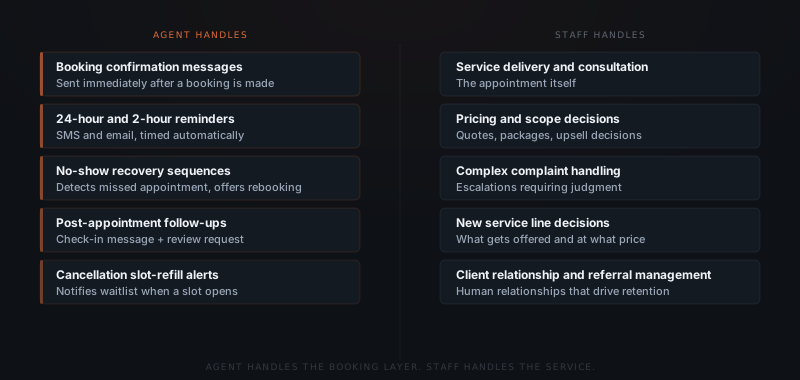
An appointment booking AI agent — for the fuller picture of what an AI agent is and how it differs from a scheduling tool, start there — operates across five distinct workflows: confirmation, reminders, no-show recovery, post-appointment follow-up, and slot-refill. Each workflow has a specific job. None of them require service-level judgment — they are communication tasks that follow predictable patterns.
Confirmation. When a booking is made — via phone, online scheduler, or direct message — the agent sends a confirmation immediately. The message states the appointment details: date, time, location or call link, what to bring or prepare. Most no-shows happen because the client forgot. A confirmation message 24–48 hours after booking resets the memory.
Reminders. The agent sends a 24-hour reminder and a 2-hour reminder before each appointment. Clients who respond to confirm attendance virtually never no-show. Clients who don't respond are flagged — and the no-show recovery sequence begins if they miss the slot.
No-show recovery. When a client misses an appointment, the agent detects the no-show and sends a recovery message within 15–30 minutes: a short, non-confrontational message noting the missed appointment and offering easy rebooking with available slots attached. Clients who are offered immediate rebooking reschedule at significantly higher rates than clients who receive a manual call days later.
Post-appointment follow-up. After a completed appointment, the agent sends a follow-up message — thanking the client, confirming any next steps, and routing a review request. Review requests sent within 48 hours of service convert at substantially higher rates than requests sent a week later.
Slot-refill. When a client cancels, the agent immediately alerts clients on the waitlist with the newly opened slot. Businesses with managed waitlists typically refill 60–70% of cancelled appointments through agent-driven slot-refill sequences.
An appointment booking agent doesn't replace the service — it handles the communication that surrounds the service. The staff member delivers the appointment. The agent handles everything before and after it.
How no-show recovery works in practice
A no-show isn't a lost appointment. It's a delayed one — if the recovery sequence starts within 30 minutes.
The default response to a no-show in most service businesses is a manual call from the front desk — hours later, or the next day, when the client has already moved on mentally. That delay is where most recovery opportunities are lost.
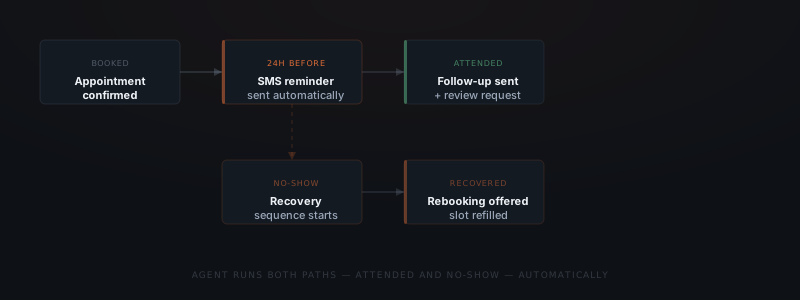
An AI agent compresses that window. When a client misses an appointment, the agent detects the absence and sends a recovery message within 15–30 minutes. The message includes specific available slots for rebooking. No staff involvement required. It happens whether the front desk is busy with walk-ins, on a call, or between shifts.
The structure of a no-show recovery sequence:
No-show detection
The agent monitors the appointment calendar. When an appointment passes without a check-in or confirmation, it flags the slot as a no-show at a defined threshold — typically 15 minutes past the start time.
Recovery message
A short, non-confrontational message goes out: acknowledging the missed slot, asking if everything is OK, and offering easy rebooking with 2–3 available slots listed. No guilt, no pressure.
Waitlist alert
Simultaneously, the agent alerts the top client on the waitlist that the slot is now available. First response gets the slot. This runs in parallel with the recovery message to the original client.
Follow-up if no response
If neither the original client nor the waitlist client responds within a set window, the slot is marked available for new bookings and the agent flags the no-show for the owner's records.
The sequence is automatic. Staff don't manage it. The slot either gets filled or it gets documented — either outcome is better than a missed slot that goes unaddressed.
What tools a booking agent connects to
An appointment booking AI agent connects to the scheduling and communication tools the business already uses. No migration required.
| Tool category | Common platforms | What the agent reads or writes |
|---|---|---|
| Scheduling | Acuity, Calendly, Jane App, Square Appointments, Google Calendar | Reads bookings, detects no-shows, adds rebook records |
| SMS | Twilio, OpenPhone, existing phone system | Sends reminders and recovery messages |
| Gmail, Outlook | Sends confirmations, follow-ups, review requests | |
| CRM | HubSpot, Pipedrive, or practice management tool | Logs appointment history, flags high-risk clients |
| Reviews | Google Business, Yelp, Trustpilot | Routes review requests after completed appointments |
The integration scope depends on how bookings are managed. A business running Acuity or Calendly with Gmail can typically go live within one to two weeks. A medical or dental practice on a dedicated practice management system — Jane App, Cliniko, or similar — takes two to three weeks depending on the API access available.
See how to know if a business process is ready to hand to an AI agent for a framework on evaluating which workflows in any business are ready for automation.
Pre-appointment intake and preparation
The booking cycle doesn't start at the reminder — it starts at the booking itself. Many service businesses collect intake information before an appointment: health history for a physical therapist, project brief for a consultant, vehicle details for a mechanic. Without an automated intake step, that information either arrives late or gets lost in a manual email chain under volume.
An AI agent handles the intake step as part of the booking confirmation flow. When a booking is made, the confirmation message includes a link to a pre-appointment form. The agent monitors form completion and sends a follow-up if the form isn't submitted within 24 hours. Completed forms are logged against the appointment record so the staff member has everything before the client walks in.
For businesses with new client onboarding, the intake agent also runs a qualification sequence. A short set of questions confirms the client is a fit, routes them to the right staff member or service type, and sets expectations before the first appointment. Clients who complete a qualification sequence show up better prepared and cancel less often — the qualification step itself is a no-show reducer.
The intake workflow connects to the same tools as the reminder workflow. Collection: Google Forms, Typeform, or a practice management intake system. Records: HubSpot, Airtable, or the scheduling platform's built-in CRM. Once the booking agent is in place, adding intake typically adds one to two days of configuration, not a separate implementation.
Businesses where the ROI is immediate
Appointment booking agents produce the fastest measurable ROI in businesses where each slot has a fixed cost (staff time) and a fixed revenue value. The calculation is straightforward: multiply the no-show rate by the average appointment value to get the monthly revenue at risk. Recovering half of that through automated reminders and recovery sequences is the floor of what a well-configured agent achieves.
| Business type | Typical no-show rate | Avg. appointment value | Monthly loss (50 slots/wk) |
|---|---|---|---|
| Medical practice | 18% | $180 | ~$8,100 |
| Hair salon | 15% | $65 | ~$2,438 |
| Personal trainer | 20% | $80 | ~$3,200 |
| Dental office | 12% | $220 | ~$6,600 |
| Coaching session | 15% | $150 | ~$5,625 |
A dental practice losing $6,600 monthly to no-shows, recovering 40% through an automated reminder and recovery sequence, recovers $2,640 per month. An implementation that costs $2,000 to build and $100/month to operate pays back in the first month.
The businesses where the math is less compelling: businesses with very low appointment volume (under 10 per week), businesses with naturally low no-show rates driven by high deposits or prepayment policies, and businesses where appointments are free and the revenue is generated by upsell during the visit.
See what AI agent implementation actually costs for a small business for a full breakdown of build costs, monthly operating costs, and break-even timelines.
Frequently asked questions
How does an AI agent reduce appointment no-shows? An AI agent reduces appointment no-shows by running an automated reminder sequence — typically a confirmation immediately after booking, a 24-hour SMS or email reminder, and a 2-hour reminder before the appointment. Automated SMS reminders reduce no-show rates by 38–50% on average.[²] For businesses running 20+ appointments per week, cutting no-shows from 18% to 9% recovers thousands of dollars in monthly revenue.
What appointment booking workflows can an AI agent automate? An AI agent automates booking confirmation messages, multi-touch reminder sequences, no-show detection and recovery outreach, post-appointment follow-ups and review requests, cancellation slot-refill alerts to the waitlist, and pre-appointment intake form collection. Tasks requiring service judgment — pricing decisions, complaint escalations, clinical assessment — remain with the staff member.
How does an AI agent handle appointment cancellations? When a client cancels or a no-show is detected, the AI agent triggers a recovery sequence: a check-in message offering rebooking with available slots, and a simultaneous slot-refill alert to the waitlist. Businesses with active waitlists typically refill 60–70% of cancelled slots through agent-driven recovery.
What businesses benefit most from appointment booking AI agents? Appointment booking AI agents produce the highest ROI for businesses with meaningful no-show costs and consistent appointment volume: medical practices, dental offices, med spas, physical therapy clinics, hair salons, personal trainers, coaches, and any service business where each slot has a fixed staff cost and a fixed revenue value. The break-even point for most implementations is recovering 2–3 no-shows per month.
Notes
- AgentZap, "Appointment No-Show Statistics: 25 Numbers Every Business Should Know in 2026." https://agentzap.ai/blog/appointment-no-show-statistics
- Cliniq Healthcare, "Automated Appointment Scheduling: The Technology That Reduces No-Shows by 30%." https://www.cliniqhealthcare.com/post/automated-appointment-scheduling-the-technology-that-reduces-no-shows-by-30
- Fortune Business Insights, "Appointment Scheduling Software Market Size." https://www.fortunebusinessinsights.com/appointment-scheduling-software-market-108614