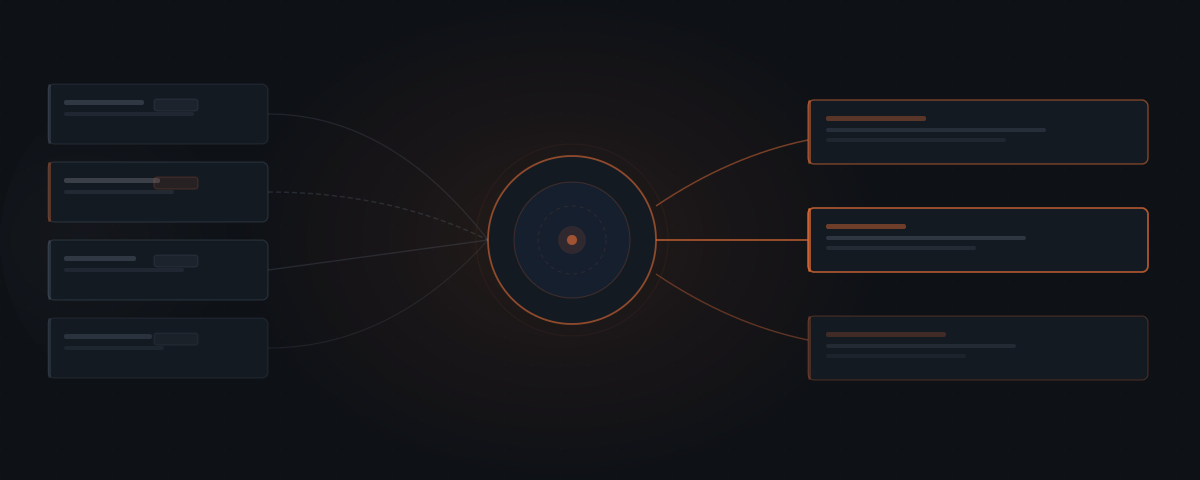
An AI agent for sales handles the administrative layer of the pipeline — CRM updates, proposal drafts, deal follow-up sequences, and pipeline reporting. Sales representatives spend roughly 28% of their time in actual selling conversations; the rest is coordination work. The agent handles that layer, and every outbound message waits for human approval before reaching a prospect.
The deal is in the pipeline. The call went well two weeks ago — but the CRM hasn't been updated since. The proposal is still being assembled. The prospect hasn't had a check-in, and the window is getting uncomfortable. Sales slowdowns in lean service businesses rarely come from bad pitching. They come from the administrative layer surrounding every deal: the CRM entry that waits, the proposal that takes three days to send, the follow-up that gets displaced by real client work. An AI agent for sales handles that layer — the updates, the drafts, the sequences, the summaries — so the conversations that require a human get the attention they deserve.
What consumes a lean sales team's time — and isn't selling
Sales representatives at B2B service businesses spend approximately 28% of their time in actual selling conversations. The remaining 72% goes to administrative work: CRM data entry, proposal writing, follow-up email composition, pipeline reporting, and meeting preparation.[¹]
For a founder managing their own pipeline alongside client delivery, that ratio lands harder. The 28% available for selling has to compete against billable hours, team management, and everything else that runs the business. When those priorities conflict — a client deliverable due versus a follow-up that needs to go out — the administrative sales task is the one that waits. The prospect does not know a competing deadline caused the delay. They know they haven't heard back.
The administrative layer in a sales pipeline is the same work, repeated across every deal:
| Sales task | Requires selling skill | Repeatable pattern |
|---|---|---|
| CRM update after a call | No | Yes |
| Proposal assembly from past work | No | Yes |
| Post-proposal follow-up | No | Yes |
| Pipeline status summary | No | Yes |
| Meeting prep from CRM history | No | Yes |
| Re-engagement outreach | No | Yes |
| Sales conversation | Yes | No |
| Pricing and scope decision | Yes | No |
| Negotiation | Yes | No |
| Relationship building | Yes | No |
Everything in the top six rows is addressable by a well-configured agent. The bottom four rows stay with the human. The agent does not reduce the time available for selling — it eliminates the administrative work that competes with it.
An AI agent operates on this distinction: handle the repeatable coordination layer, route everything that requires judgment to a named person. In a sales context, that line is clearer than it is in most workflows.
What a sales agent handles across the pipeline
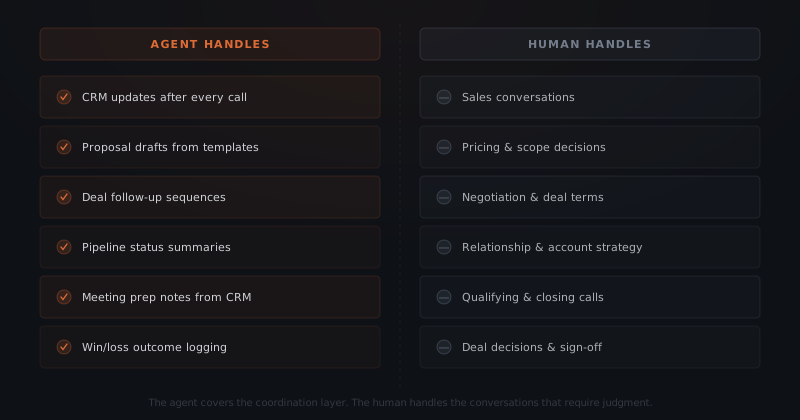
A sales agent handles six categories of work that appear consistently at every stage of a B2B sales pipeline.
CRM updates after calls. Every time a sales call ends, the CRM should reflect what happened: who was on the call, what was discussed, what the next step is, and what stage the deal should move to. In practice, this update gets deferred to the end of the day or the end of the week, and the details lose precision with time. The agent updates the CRM immediately after the call record appears — or after the founder adds a brief note to the record — keeping the pipeline current without requiring a separate data-entry step.
Proposal drafts from templates. When a qualified deal reaches the proposal stage, the agent assembles a near-complete draft from the firm's existing proposal templates, the prospect's CRM record, and the relevant service tier. The founder reviews and adjusts the pricing, refines the scope language, and approves before the proposal sends. According to Proposify research, proposals sent within 24 hours of a sales conversation close at a 35% higher rate than proposals sent after 48 hours — the agent eliminates the assembly time that makes same-day turnaround impractical.[²] For a detailed walkthrough of how proposal agents work, see AI agents for proposals.
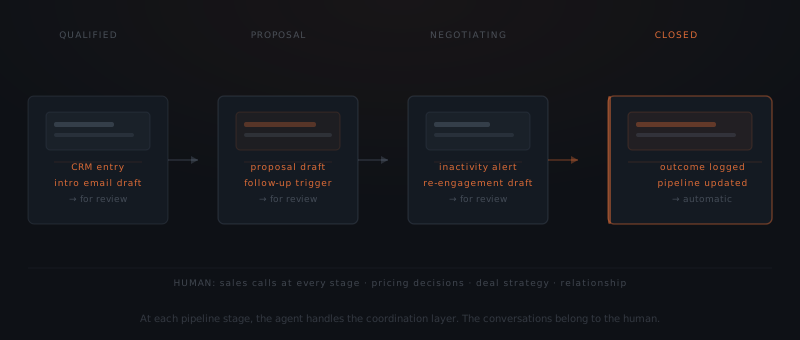
Deal follow-up sequences. When a proposal has been out for a defined number of days without a response, the agent drafts a check-in and routes it to the review queue. When a deal sits in the same CRM stage beyond a configured threshold, the agent drafts a re-engagement message for founder review. The agent does not decide whether to reach out — it drafts the message when the trigger fires, and the founder decides whether to send it. For the full detail on how trigger-based follow-up works, see AI agents for follow-up.
Pipeline status summaries. Once a week, the agent pulls deal stage data from the CRM and generates a structured pipeline summary: open deals by stage, days since last activity, next step status, and deals that have missed their defined milestone. The founder reviews the summary to decide where attention is needed — without having to open each deal record individually.
Meeting preparation notes. Before a scheduled sales call, the agent pulls the deal record, the last two or three interaction logs, any open questions from prior conversations, and a summary of what the prospect has shared to date. The founder reviews a structured brief rather than assembling context from memory or scrolling through past emails.
Win/loss outcome logging. When a deal closes — won or lost — the agent logs the outcome, the final deal value, the reason code if applicable, and updates the deal stage in the CRM. For won deals, the agent initiates the handoff sequence to the delivery team. For lost deals, the agent routes the record to a post-mortem flag for periodic review.
The approval layer protects deal relationships
Every proposal draft, follow-up message, and outreach the agent generates sits in a review queue. Nothing reaches the prospect until a named person approves it. That is not a configurable setting — it is the architecture of the workflow.
Sales communications carry relationship weight in a way that customer support tickets do not. A poorly timed follow-up can signal pressure. A proposal that misrepresents scope can damage trust faster than it was built. The approval layer in a sales agent workflow exists specifically because the stakes per message are higher than in routine communications.
The agent doesn't close the deal. It stops the deal from dying between calls.
In practice, the approval queue looks like this: the agent generates a draft — a follow-up email, a proposal, a re-engagement message — and notifies the founder or sales lead through the channel already in use (Slack, email, or the CRM interface). The founder sees the draft, the context that triggered it (the deal record, the days since last contact, the last interaction), and the approve/edit/reject options. Approving sends the message from the founder's address. Editing opens the draft for revision before sending. Rejecting closes the draft and logs the decision.
The agent does not have send permissions. The sales agent drafts; the human decides.
High-performing sales teams are 2.8x more likely to use AI tools than underperforming teams, according to Salesforce's State of Sales research — and the AI use that correlates with performance is not autonomous outreach.[³] The teams reporting performance gains are using AI to reduce administrative load and improve response speed, while keeping relationship-sensitive decisions with the people who understand the prospect.
Where the lead generation agent ends and the sales agent begins
The lead generation workflow and the sales workflow cover different parts of the pipeline. Understanding the boundary between them prevents both overlap and gaps.
A lead generation agent handles the period between first contact and first qualified conversation: immediate first-response, qualifying questions, routing decisions, and follow-up for unresponsive prospects. The lead generation agent's job ends when a prospect has been qualified and routed to a named person for a live conversation. That handoff — typically a CRM stage transition from "incoming" to "qualified" or "discovery" — is where the sales agent's job begins. For a full description of the lead generation workflow, see AI agents for lead generation.
The sales agent picks up from the first qualified conversation and covers the pipeline from that point through close. The agent creates the CRM record for the deal, drafts the post-call summary, tracks the proposal, monitors for inactivity, and logs the outcome.
After close — won or lost — the sales agent's job in that deal ends. For won deals, the delivery or onboarding workflow takes over. For lost deals, the deal enters a post-mortem review queue.
What needs to be defined before the agent goes live
A sales agent requires four things to be written down before it touches the pipeline.
Deal stage definitions. The agent reads the CRM and responds to stage transitions. If the CRM has inconsistent stage labeling — "discovery" and "qualifying" used interchangeably, some deals skipping stages — the agent's trigger logic will misfire. Audit and standardize deal stages before deployment.
CRM field mapping. Define which CRM fields the agent reads (contact record, company, deal value, last activity, assigned owner) and which fields the agent writes (activity logs, stage updates, meeting notes). Limit write access to the specific fields the agent needs. Unrestricted write access to the CRM is not required and creates unnecessary risk.
Proposal templates. The agent assembles proposals from existing templates, not from scratch. If the firm does not have documented proposal templates for each service type, the agent has nothing to assemble from. Template creation is a pre-deployment step. Three to five templates covering the most common engagement types is enough to start.
Follow-up windows by stage. Define the trigger: how many days after a proposal send does the agent draft a check-in? How many days without activity in the negotiating stage triggers a re-engagement draft? These windows are specific by stage and by deal type. A large engagement may warrant a longer wait; a standard retainer inquiry may need a faster touch.
| Integration | Role in the sales workflow | Access required |
|---|---|---|
| HubSpot | Deal records, stage tracking, activity logs | Read deal and contact, write activity log and stage |
| Salesforce | Pipeline management, interaction history | Read/write deal record and activity |
| Pipedrive | Deal and contact pipeline | Read/write deal and contact |
| Gmail / Outlook | Outbound approvals, inbox monitoring for prospect replies | OAuth — reads threads, sends on approval only |
| Slack | Approval notifications when drafts are queued for review | Webhook — notification only |
| Proposal tool (Proposify, PandaDoc, Qwilr) | Proposal send and tracking | API — send and track open/sign events |
How to deploy a sales agent
Audit and standardize your CRM
Review the active pipeline for consistent deal stage labeling, complete contact records, and logged interaction history. The agent reads the CRM to generate accurate outputs — if the data is incomplete, the outputs will reflect that. Cleaning takes time upfront; skipping it creates unreliable agent behavior later.
Document your proposal templates
For each of the three to five most common engagement types, create a structured proposal template: service description, deliverables, timeline, pricing tiers, and terms. Tag each template by engagement type so the agent matches the right template to each deal. Proposals the agent drafts from an incomplete template will require more review time to adjust.
Define follow-up windows by deal stage
Set specific trigger windows: X days after proposal sent with no reply, X days without activity in negotiating stage. Define the action for each trigger: draft a follow-up, send a pipeline alert to the founder, or both. Different engagement types may warrant different windows — a high-value deal may need more patience than a standard inquiry.
Connect CRM, inbox, and proposal tool
Grant the agent read access to CRM deal records and email threads relevant to each deal. Grant write access only to the specific CRM fields defined in Step 1. Connect the proposal tool API so the agent can track when a proposal is opened or signed. Inbox read access ensures the agent detects prospect replies before triggering a follow-up.
Run the first two weeks with full approval
Start with every draft requiring founder review — proposals, follow-ups, re-engagement messages, and pipeline summaries. After two weeks, review which outputs consistently required no substantive editing. Expand trust progressively: the outputs that proved reliable over two weeks of reviewed performance are the ones that can move to a lighter review cadence.
Where sales agent implementations go wrong
Five failure modes appear consistently across sales agent deployments.
The CRM is too empty to pull from. The agent needs a complete, current CRM to generate useful outputs. If deal records lack contact details, interaction history, and stage data, the agent cannot assemble an accurate proposal draft or generate a meaningful pipeline summary. The most common first step in a failed implementation was skipping the CRM audit. Clean the data before connecting the agent.
No proposal templates exist. The agent assembles from templates — it does not write proposals from scratch. Founders who have been generating proposals ad hoc, pulling from old documents and rewriting each time, have no template for the agent to use. Template creation is a prerequisite, not a post-deployment task. Document three to five service-specific templates before the agent goes live.
Follow-up windows are not defined by stage. Without specific trigger windows per stage, the agent either follows up on everything at the same interval (creating noise) or does not follow up at all. The trigger windows define the agent's behavior — and they need to match how the business actually sells. A recruiting firm may close quickly; a consulting firm may have a 90-day sales cycle. The windows need to fit the real cycle.
Inbox integration is missing. If the agent monitors the CRM for deal status but does not read the inbox, the agent does not detect when a prospect replies outside the tracked thread. A follow-up draft goes out while the founder is already in a live conversation with the same prospect. Connect both the CRM and the relevant email inbox to give the agent complete visibility.
Approval queue goes unmonitored. The agent generates the draft and routes it to a queue. If the founder does not process the queue daily, drafts accumulate and the timing advantage disappears. The approval queue should be part of the daily routine — a 10–15 minute window in the morning is enough to process a typical sales pipeline's daily draft volume.
McKinsey's 2024 research on AI in business functions found that sales and marketing are among the top functions generating measurable ROI from AI deployment — with more than 40% of respondents reporting revenue increases attributable to AI use in those functions.[⁴] The implementations that produce those results are the ones where the administrative layer is clearly defined before deployment, the approval architecture is maintained throughout, and the human's role in actual selling is protected from the agent's scope.
Frequently asked questions
What does an AI agent do in a sales workflow? An AI agent for sales handles the administrative layer around deals — CRM updates after calls, proposal drafts from templates, follow-up sequences for open deals, pipeline status summaries, and meeting prep notes. The agent does not conduct sales conversations, make pricing decisions, or negotiate. Every outbound message the agent generates waits in a review queue until a named person approves it before it reaches the prospect.
Can an AI agent replace a salesperson? An AI agent for sales does not replace a salesperson. The agent handles the coordination work that surrounds the selling — the CRM entry, the proposal assembly, the follow-up initiation, the pipeline report. The sales conversation itself — the call, the negotiation, the close — stays with the human. The agent frees the salesperson to spend more time on conversations and less time on administrative tasks between them.
What CRM systems does a sales agent integrate with? A sales agent integrates with HubSpot, Salesforce, Pipedrive, and most CRM systems that expose an API. The agent reads deal stage data, contact records, and interaction history — and writes back CRM updates, activity logs, and stage transitions. Read access covers the full deal record; write access is scoped to the fields that need updating after each interaction.
How long does it take to set up a sales agent? A focused sales agent implementation — covering CRM integration, proposal templates for three to five service types, a follow-up sequence for open deals, and approval queue configuration — typically takes three to four weeks. The first week covers CRM field mapping and template setup. The following weeks cover sequence configuration, approval workflow setup, and testing against real pipeline deals.
Notes
- McKinsey & Company. "The future of B2B sales: The big reframe." McKinsey Sales & Channel Management. https://www.mckinsey.com/capabilities/growth-marketing-and-sales/our-insights/the-future-of-b2b-sales-the-big-reframe — source for the finding that sales representatives spend approximately 28% of their time in actual selling activities.
- Proposify. "The State of Proposals." https://www.proposify.com/state-of-proposals — source for the finding that proposals sent within 24 hours close at a 35% higher rate than those sent after 48 hours.
- Salesforce. "State of Sales, 7th Edition." Salesforce Research, 2024. https://www.salesforce.com/resources/research-reports/state-of-sales/ — source for the finding that high-performing sales reps are 2.8x more likely to use AI than underperforming teams.
- McKinsey & Company. "The state of AI in early 2024: Gen AI adoption spikes and starts to generate value." McKinsey Global Survey, 2024. https://www.mckinsey.com/capabilities/quantumblack/our-insights/the-state-of-ai — source for the finding that sales and marketing are among the top functions generating measurable ROI from AI deployment.