Zapier and AI agents solve different problems. Zapier executes rules reliably when inputs are consistent and outputs are defined. An AI agent reads context, handles variation, and makes decisions when the input changes each time. Most businesses replacing Zapier with an agent for the wrong task type end up with less reliable automation. The right question is not which tool is better — it is which task you are giving to each one.
A founder switches their client onboarding workflow from Zapier to an AI agent because the demos look impressive. Three weeks later, the agent is sending slightly different intake confirmation emails every time — minor variations in phrasing, different field formatting, occasional tone drift. Zapier had sent the same email every time, perfectly. The agent was more sophisticated. It was also worse at this specific job. The problem was not the agent. The task was wrong for the tool.
Zapier vs. AI agent: side-by-side
The tools are not competitors — they fail at opposite things by design. The comparison is only useful at the task level.
| Zapier | AI agent | |
|---|---|---|
| Decision logic | Pre-configured filters and paths only | Reads context and decides at runtime |
| Handles unstructured input | No — skips silently or errors | Yes |
| Output consistency | Deterministic — same every time | Variable — adapts to input |
| Native app integrations | 9,000+ | Built per deployment |
| Setup time | Hours to days | 2–8 weeks |
| Best task type | Structured data flows, scheduled triggers | Variable, context-dependent tasks |
| Pricing | $19.99–$69/month (by task count) | $200–750/month infrastructure + API |
| Maintenance | Low — unless workflow structure changes | Medium — prompt updates, integration drift |
| Failure mode | Silent skip or error on unexpected input | Wrong decision on ambiguous input |
The pricing difference reflects different cost models. Zapier charges by task count — $19.99/month covers 750 tasks, $49/month covers 2,000. Make prices the same way under a different name: what it once called operations it now bills as credits, and a five-step scenario spends roughly five credits per run regardless of whether a step branches or transforms data.[⁵] An AI agent charges by infrastructure and API usage regardless of task count. For high-volume structured flows, Zapier or Make is significantly cheaper. For workflows where Zapier would require dozens of custom paths for every input variation, the agent is the only practical option.
What a Zap is actually built from
A Zap is a trigger plus one or more configured action steps — the minimum viable version is one trigger and one action. Multi-step Zaps chain several actions after a single trigger, running each one in sequence.
Three built-in tools extend that structure without adding reasoning. Paths adds branching logic: up to 10 branches per path group, nested up to three levels deep, with each branch running in sequence rather than in parallel.[³] Filters stop a run when data does not meet a defined condition — text, number, date, boolean, or existence checks — and a filtered-out run consumes no task.[⁴] Formatter transforms data between steps: splitting a full name into first and last, extracting an email address from a block of text, reformatting a date, replacing a string.
None of this reads intent. A Path branch keyed to "contains the word refund" still cannot tell a refund request from a complaint that happens to mention the word — it matches the text, not the meaning. That is the ceiling Zapier's own branching tools are built against, not a shortcoming specific to one feature.
Why Zapier fails silently on unexpected input
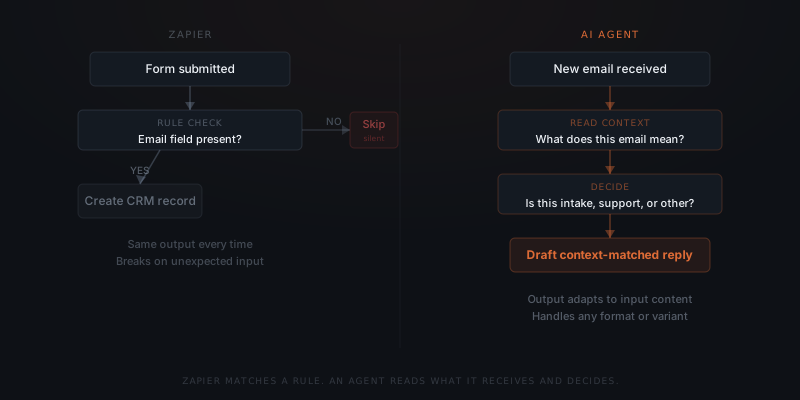
Zapier fails when a Zap's trigger, filter, or path condition doesn't match what arrives — it skips the record or errors out, without asking whether a different action might fit. That's a deliberate tradeoff: the same predictability that makes 9,000+ prebuilt integrations reliable at scale also means Zapier can't improvise when the input shape changes. For the full breakdown of when a workflow needs fixed rules versus judgment, see AI agent vs. automation.
Zapier breaks when the input changes. An AI agent breaks when the decision criteria are unclear. Replacing Zapier with an agent does not reduce failure — it changes the failure mode.
72% of enterprises are now using or testing AI agents, according to Zapier's 2026 State of Agentic AI survey.[¹] Of those, only 30% cite routine workflow automation as where they see the most agent potential — the majority are deploying agents for tasks that require judgment, not tasks that require consistency.[¹] That split reflects the actual division of labour between agents and traditional automation tools like Zapier.
Where Zapier is the right tool
Zapier handles three task types better than an AI agent.
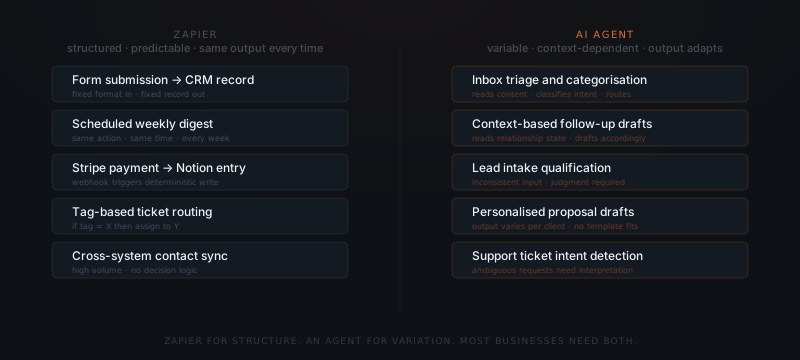
Structured data flows. Moving records between systems when the format is consistent — a new Typeform submission creates a HubSpot contact, a completed Stripe payment triggers a Notion entry, a calendar event updates a spreadsheet row. The input format never changes. The output format never changes. An agent adds unnecessary variability to a task that needs none.
Scheduled triggers. Running the same action on a recurring schedule — generating a weekly report, syncing a data source every hour, sending a daily digest. Zapier executes these reliably at the defined interval. An agent is not suited for scheduled, non-contextual operations.
High-volume, low-decision tasks. Processing hundreds of form submissions, syncing contacts across three systems, routing tickets based on a fixed tag. Volume does not change the decision logic. Zapier scales these without degradation. Zapier currently connects to 9,000+ apps — each integration built and maintained by Zapier's team — which means no custom API work for connecting standard tools.[²] That breadth is a real advantage over narrower automation tools and over agent builds alike: an agent reaching a niche invoicing tool or a regional CRM has to build that connection itself. Zapier already built it.
Where an AI agent is the right tool
An AI agent handles tasks where the input varies, the right action depends on content, or the output needs to be drafted rather than copied.
Email triage and routing. Incoming emails do not arrive in a consistent format. A support request, a partnership inquiry, and a billing question can all arrive in the same inbox. Zapier cannot distinguish them without a custom filter for every variant. An agent reads each email, categorises it correctly, and routes or drafts a response appropriate to the content.
Follow-up sequences with variable triggers. A follow-up that should differ based on whether the prospect opened the proposal, attended the call, or went silent requires reading context. Zapier can send a follow-up on a timer. An agent drafts the follow-up based on what it knows about the current state of the relationship.
Intake qualification. New leads arrive through multiple channels with inconsistent information. An agent reads each submission, identifies missing fields, and routes the lead correctly — or drafts a clarification request when something is ambiguous. Zapier can route based on a field value but cannot reason about what the field means.
49% of customer support teams and 47% of operations teams have now deployed AI agents — the two functions that most frequently deal with variable, context-dependent inputs.[¹] These are not functions Zapier was ever designed to handle at the level of judgment required. For a sequencing framework, see which workflows to automate first.
Running Zapier and an AI agent in the same system
The most common setup for a service business is not Zapier or an AI agent — it is both, doing different jobs in the same workflow.
Zapier handles the structured hand-offs. A new qualified lead lands in the CRM — Zapier creates the record, assigns the owner, and notifies the team in Slack. These three actions always happen in the same sequence with the same outputs. No agent needed.
The agent handles the variable response. The agent reads the new lead record, checks for previous contact history, drafts a personalised outreach email, and queues it for approval. The draft depends on what the record contains. Zapier could not write this draft without a template for every scenario.
The two tools run in sequence: Zapier creates the data structure, the agent acts on the content. Neither replaces the other. Each handles the part of the workflow that the other cannot.
Zapier executes. An agent decides. A business that needs both should not pick one.
Zapier has shipped its own agent layer on top of this, called Zapier Agents. A team describes a role in plain language, and Zapier Copilot assembles an agent that pulls from connected business data and acts across Zapier's app directory.[⁶] For a workflow that lives entirely inside tools Zapier already connects to, that native option can be enough — it inherits Zapier's task-based pricing and its existing integrations, with no separate infrastructure to stand up.
Zapier Agents hits the same wall Zaps do: systems outside Zapier's directory, reasoning across data sources with conflicting formats, or approval logic tied to a specific CRM's permission model. A custom agent implementation starts there — built against the business's own systems rather than what Zapier's connector catalog happens to expose. The test is simple: if the job fits inside "connect to my Zapier-integrated apps and follow this role," Zapier Agents may cover it. If it needs logic across systems Zapier doesn't reach, it needs a build.
For the decision framework on which processes are ready for an agent, see how to know if a business process is ready to hand to an AI agent.
When to migrate from Zapier to an agent — and when not to
Businesses that migrate Zapier workflows to AI agents for the wrong reasons end up rebuilding what Zapier did more reliably for a higher cost. The right reason to migrate a Zapier workflow is that the workflow contains decision logic you are currently approximating with multi-step filters and custom paths.
Signs a Zapier workflow is ready to migrate:
- You have 15+ filter steps trying to handle every input variant
- New input formats break the Zap and require a new path
- The workflow output requires manual correction because Zapier cannot read context
- You are maintaining separate Zaps for what is functionally one workflow with variable inputs
A concrete version of this: a support inbox routed with Paths, five branches keyed to subject-line keywords — billing, cancellation, technical, sales, other. A message arrives that's a cancellation threat wrapped in a billing question. Paths runs its branches in sequence and matches whichever condition is met first — it has no way to weigh which intent matters more, or draft a response that covers both.[³] That's not a misconfigured Zap. Paths expresses fixed conditions; it doesn't decide which one should win when two apply at once. An agent reading the same message identifies both intents and drafts a response addressing both, or flags it for a human call.
Signs a Zapier workflow should stay in Zapier:
- Structured input, structured output, no decision logic needed
- High volume, low variability — the same action runs thousands of times identically
- The workflow uses one of Zapier's 9,000+ native integrations that would require custom API work in an agent
- The workflow runs on a schedule with no contextual variation
How to migrate without disrupting operations: Run the agent alongside the Zapier workflow for two to four weeks before cutting over. On tasks where the agent outperforms — more accurate routing, better drafts, correct handling of edge cases — switch. On tasks where the agent introduces variability Zapier was eliminating — keep the Zap. Most service businesses run both in production permanently, not as a transition state.
For the cost breakdown of an agent implementation versus a Zapier subscription at scale, see AI agent vs. hiring cost.
The most common migration mistake is switching a high-volume structured workflow to an agent because "agents are more capable." More capable is not the evaluation criterion. Zapier's determinism — the same output every time — is exactly what structured workflows require. An agent's context-reading and decision-making is exactly what variable workflows require. The question is always which task type you have, not which tool is newer.
A second common mistake is using an agent to replace Zapier's integration breadth. Zapier connects to 9,000+ apps with maintained integrations. An agent workflow that needs to connect to five tools requires building and maintaining five integrations. For businesses whose workflows live entirely within Zapier's app directory, that integration cost makes the agent significantly more expensive to maintain than a Zapier subscription — regardless of what the agent does better at the task level. Zapier's integration breadth is a real competitive advantage for standard tool stacks. It is not a reason to avoid agents — it is a reason to keep Zapier running alongside them for exactly the workflows it handles best.
Frequently asked questions
What is the difference between Zapier and an AI agent? Zapier executes predefined rules — when a trigger fires, it runs the configured action with consistent output. An AI agent reads context and makes decisions — the same trigger produces different outputs depending on what the input contains. Zapier is reliable for structured, predictable workflows. An AI agent handles variation that Zapier cannot process.
When should you replace Zapier with an AI agent? Only for tasks where the input varies or the right action depends on content. For structured data flows, scheduled triggers, and high-volume tasks with no decision logic, Zapier remains the better tool. Replacing Zapier with an agent for these tasks introduces variability where you need consistency.
Can Zapier and an AI agent work in the same workflow? Yes — and this is the most practical setup for most service businesses. Zapier handles the structured hand-offs: record creation, routing, notifications. The agent handles the variable tasks: drafting, categorising, qualifying. Each runs the part of the workflow the other cannot.
What happens when you use an AI agent for tasks Zapier is better at? The agent introduces output variability into a workflow that needed consistency. A template email becomes slightly different on every send. A data sync produces inconsistent field formats. The agent is not failing — it is doing what agents do. The task was wrong for the tool.
Can Zapier build an AI agent? Zapier ships its own agent builder, Zapier Agents, which uses Zapier Copilot to assemble an agent from a plain-language role description and connect it to Zapier's app directory. It works well for tasks that stay inside Zapier's existing integrations and data model. It stops being enough once the agent needs custom logic across systems outside that directory — that is where a custom agent implementation takes over.
How many apps does Zapier connect to compared to what an AI agent needs? Zapier connects to more than 9,000 apps through prebuilt, maintained integrations. A custom AI agent connects to exactly the systems a business uses — often five to ten — built and maintained individually. Zapier's breadth wins for teams standardized on common tools. An agent wins when a business runs tools Zapier does not natively support or needs judgment Zapier's connectors cannot provide.
Notes
- Zapier, "State of Agentic AI Adoption Survey 2026," Zapier Inc., 2026.
- Zapier, "App Directory," Zapier Inc., 2026.
- Zapier, "Add branching logic to Zaps with Paths," Zapier Help Center, 2026.
- Zapier, "Filter and path rules in Zap workflows," Zapier Help Center, 2026.
- Make, "Pricing & Subscription Packages," Make (Celonis), 2026.
- Zapier, "Zapier Agents," Zapier Inc., 2026.