AI time savings in 2026 are real but often overstated. The Glean Work AI Index 2026 found workers save roughly 11 hours a week through automation — yet spend 6.4 hours a week 'botsitting': feeding context, checking outputs, and fixing mistakes. The gross figure and the net figure are different numbers. Durable savings come from agents that own a whole workflow — including the coordination overhead between steps — not from speeding up isolated tasks.
11 hours a week. That is what workers say AI automation saves them, according to the Glean Work AI Index 2026 — roughly a third of a work week.[⁶] But the same 2026 data found workers spend 6.4 hours a week "botsitting": feeding AI missing context, checking its outputs, and fixing its mistakes.[⁶] The gross saving and the net saving are not the same number.
Both figures point to the same lesson. Time savings from AI are real, but whether they are captured or lost depends on how the work is structured around the tool. An assistant that speeds up isolated tasks creates almost as much checking work as it saves. An agent — see what an AI agent is for the distinction — that owns a whole workflow, including the coordination overhead between steps, is where the net saving holds.
Published benchmarks measure how long it takes a person to complete a specific task with AI assistance. They do not measure what happens between tasks: the scheduling back-and-forth, the status check email, the follow-up that never got sent, the document request that sat for a week waiting for a reminder. That is where business time goes. An AI agent handles the whole workflow, including the overhead between steps. The practical savings number is consistently larger than what task-completion benchmarks show.
What published benchmarks say about AI time savings
The most-cited studies on AI productivity arrive at different numbers because they measure different things. Each is correct in its scope.
Glean Work AI Index 2026 surveyed digital workers, 87% of whom now use AI at work.[⁶] Workers reported saving roughly 11 hours a week through automation — while spending 6.4 hours a week maintaining and correcting AI output. Only 13% said their organization performs significantly better as a result. The gap reflects savings captured at the individual level but lost before they reach the business.
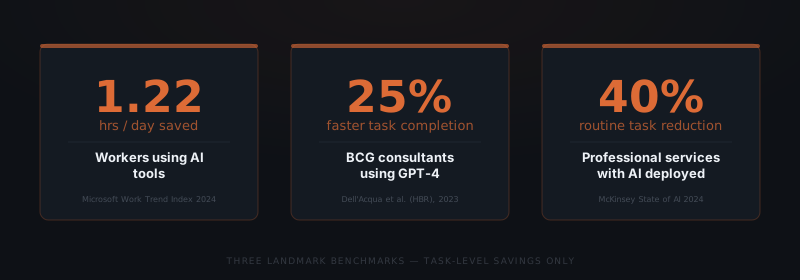
Microsoft Work Trend Index 2024 surveyed 31,000 workers across 31 countries.[¹] Workers using AI tools reported saving 1.22 hours per day on communication, content creation, and information retrieval. When Microsoft analyzed specific task categories: email management improved 30–40%, content drafting improved 20–30%, and information retrieval improved 25–35%.
Dell'Acqua et al. (Harvard Business School / Wharton), 2023 ran a controlled experiment with 758 BCG consultants.[²] Consultants using GPT-4 completed defined professional tasks 25.1% faster and produced work rated 40% higher quality by independent evaluators. The study is notable because the quality improvement was as large as the speed improvement — AI assistance didn't just speed up the work, it improved the output.
McKinsey State of AI 2024 surveyed 1,363 organizations on AI adoption outcomes.[³] Organizations that deployed AI in professional services workflows reported a 20–40% reduction in time spent on routine tasks. The range reflects implementation maturity: organizations with AI deeply integrated across multiple workflows sat at the upper end; organizations using AI for individual-task assistance sat at the lower end.
A fourth benchmark that is less discussed: GitHub Copilot research found that developers using Copilot completed coding tasks 55% faster than those without it.[⁴] The highest single-task savings figure in the published literature comes from software development — a domain where the task itself is well-defined and measurable.
| Study | Scope | Time saving found |
|---|---|---|
| Glean Work AI Index 2026 | Digital workers, 87% using AI | 11 hrs/week saved, 6.4 hrs/week botsitting |
| Microsoft Work Trend Index 2024 | 31,000 workers — email, content, search | 1.22 hours/day average |
| Dell'Acqua et al. (HBR), 2023 | 758 BCG consultants — defined tasks | 25.1% faster completion |
| McKinsey State of AI 2024 | 1,363 organizations — routine tasks | 20–40% time reduction |
| GitHub / Microsoft, 2022 | 95 software developers — coding tasks | 55% faster task completion |
| METR benchmarks, 2024 | AI agent software tasks — multi-step | ~45% faster on defined tasks |
Why workflow savings exceed task savings
Task savings (25–55%) measure how much faster a single task is completed. Workflow savings measure how long a complete process takes from start to finish — including coordination overhead. Published benchmarks almost exclusively measure task savings. The workflow number is typically 2–3x larger.
Asana's Anatomy of Work Index 2024 found that knowledge workers spend 60% of their working day on coordination, communication, and status updates — and only 33% on the skilled work they were hired to perform.[⁵] This figure is remarkable because it means the majority of working hours are not spent executing tasks — they are spent on the connective tissue around tasks.
When an agent handles a workflow — not just a task — it eliminates:
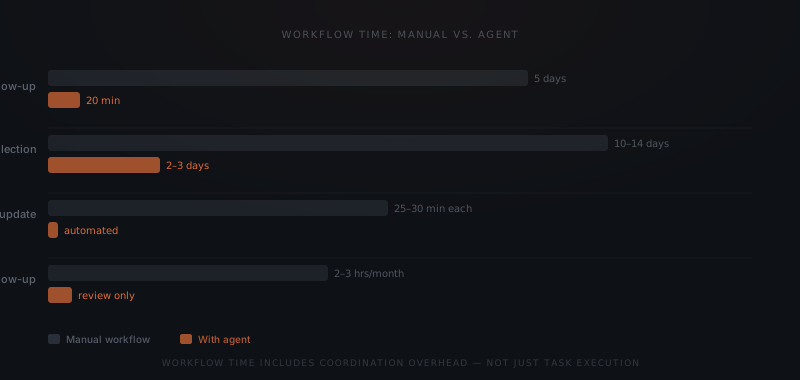
Scheduling back-and-forth. A client needs to book a consultation. The manual process involves an email with availability, a reply with alternative times, a confirmation, and a reminder. In a five-day window, this cycle takes 2–3 days of elapsed time and 20–40 minutes of actual work. An agent handles the entire exchange in minutes.
Status check interruptions. A client or colleague emails to ask "what is the status of this?" At a service business with 20–50 active matters or client engagements, these interruptions arrive 5–15 times per day. Each one takes 3–5 minutes to field — the interruption overhead is an additional 20–40 minutes. An agent sends proactive status updates, eliminating most inbound status requests entirely.
Follow-up that didn't happen. The highest-cost coordination gap in most service businesses is the follow-up that never got sent. A lead went cold. A document request sat unacknowledged for a week. A renewal cycle started three weeks too late. The agent doesn't miss follow-ups. The coordination overhead is zero — because the agent handles it regardless of what else is on the agenda.
Handoff delays. In a multi-step process — intake form → conflict check → calendar invite → confirmation → reminder — each handoff between steps introduces delay if any step requires human memory. An agent executes each step as soon as the trigger fires, not when a person next opens the relevant tab.
Agents don't just speed up tasks. They eliminate the time between them.
For context on which workflows to implement first — which maximises time savings per hour of implementation effort — see which workflows to automate first.
Time savings by business function
Estimates below reflect typical service businesses with 5–40 employees running communication-heavy workflows. Ranges reflect implementation completeness and process volume.
| Business function | Workflows automated | Weekly time saved per person | Primary source |
|---|---|---|---|
| Client follow-up | Inquiry response, cadence sequences, renewal outreach | 3–7 hours | McKinsey 2024, Microsoft WTI 2024 |
| Document coordination | Collection requests, tracking, follow-up | 2–5 hours | McKinsey 2024 |
| Status updates | Milestone-triggered proactive notifications | 1–3 hours | Asana AOW 2024 |
| Billing and invoicing | Invoice sending, reminders, payment confirmation | 1–3 hours | McKinsey 2024 |
| Scheduling coordination | Booking, confirmation, reminders | 1–2 hours | Microsoft WTI 2024 |
| Lead qualification | Intake forms, routing, qualification sequences | 2–4 hours | HBR/Dell'Acqua 2023 |
The highest leverage functions are those with the most coordination overhead per task. Client follow-up and document coordination consistently produce the largest savings because both are predominantly coordination, not execution. The agent eliminates the overhead almost entirely.
What determines how much time your implementation saves
Three variables determine whether an implementation lands at the lower or upper end of any savings range.
Process documentation quality. An agent can only handle what is clearly defined. A workflow that exists in someone's head — the informal follow-up that experienced staff handle by feel — requires documentation before an agent can execute it. Teams that can describe their process step by step before implementation start recover time from the first week. Teams that discover the process during implementation recover time from week 4–6 once the agent has been calibrated. For the framework on documentation readiness, see how to know if a business process is ready to hand to an AI agent.
Integration depth. An agent connected to the email system, the CRM, and the calendar operates on the full workflow. An agent connected only to email handles a portion of it. Each additional integration extends the automation boundary and compounds the coordination overhead the agent eliminates. The marginal time savings from each added integration are typically front-loaded — the first three integrations deliver more combined savings than the next five.
Volume. Time savings scale with volume. A follow-up cadence serving 10 active leads per month saves 1–2 hours per week. The same cadence serving 100 active leads saves 8–12 hours per week, because the agent handles the same work regardless of volume. Low-volume implementations still produce meaningful ROI, but high-volume implementations produce disproportionate returns.
Magnitude of savings is one half of the picture; the other is speed — see how long AI ROI actually takes for the companion numbers.
How to measure AI agent time savings in your own business
Generic benchmarks describe the category. Your actual savings depend on your specific workflows and volumes.
Step 1: Establish a baseline before go-live. For the target workflow, track how many hours per week it consumes — across all people involved — for four weeks before the agent launches. Include the coordination overhead, not just execution time.
Step 2: Separate elapsed time from effort. A document collection cycle that takes 12 days to complete may only require 90 minutes of actual human work. The agent compresses elapsed time by eliminating wait states. Track both: the saved human effort and the compressed cycle time.
Step 3: Measure at week 4 and week 12. The first 4 weeks of an implementation involve calibration — edge cases surface, triggers get adjusted. The week-4 number understates mature performance. The week-12 number is the stable operating baseline.
Step 4: Calculate at the billing rate. For client-facing roles, the relevant savings number is not hours recovered — it is what those hours were worth billed. For a professional billing $250 per hour, recovering 3 hours per week is worth $39,000 annually. The implementation cost recovers in days, not months.
The question behind the question
When a founder asks "how much time will this save?" the real question is usually "is this worth the cost?" The answer depends on where your team's time is going right now.
If the highest-volume activity in your week is coordination — following up, status-checking, reminding, scheduling — an agent addresses the primary cost. If the highest-volume activity is delivery — the coaching, the analysis, the legal work — an agent addresses the overhead around it, and the savings frame shifts from "recapturing hours" to "delivering the same work without the friction that surrounds it."
Both outcomes are real. Both are worth having. The question is which one your business needs most right now.
For an implementation-cost breakdown and a full ROI calculation model, see what AI agent implementation actually costs for a small business.
Frequently asked questions
How much time do AI agents save in 2026? The Glean Work AI Index 2026 found workers save roughly 11 hours a week through AI automation, but spend 6.4 hours a week "botsitting" — feeding context, checking outputs, and fixing mistakes. Earlier benchmarks measured task-level gains: Microsoft's 2024 Work Trend Index found 1.22 hours per day saved, and BCG consultants completed tasks 25.1% faster with 40% higher quality. Net workflow savings depend on eliminating coordination overhead between tasks, not just speeding up isolated tasks.
What is the difference between task savings and workflow savings? Task savings measure how much faster a single action is completed with AI assistance. Workflow savings measure how long a complete business process takes from start to finish, including coordination overhead between tasks — scheduling, follow-up, status checks, handoffs. Agents eliminate coordination overhead. Published benchmarks measure task savings. Workflow savings are typically 2–3× larger.
Which business functions save the most time with AI agents? Client communication and follow-up workflows consistently produce the largest time savings — 3 to 7 hours per week per person — because they are high-volume, repetitive, and largely coordination overhead. Document collection workflows save 2 to 5 hours per week. Billing and scheduling coordination each save 1 to 3 hours per week at typical service business volumes.
How long does it take for an AI agent to pay for itself? At a median service professional billing rate of $200–$300 per hour, recovering 2 hours of billable time per week recoups a $3,000–$5,000 implementation cost in 2–4 weeks. For non-billable roles, an agent that handles 5 hours per week of coordination work displaces $15,000–$30,000 in annual labor cost depending on the role and rate.
Notes
- Microsoft, "2024 Work Trend Index: AI at Work Is Here. Now Comes the Hard Part," Microsoft Research, May 2024.
- Fabrizio Dell'Acqua et al., "Navigating the Jagged Technological Frontier: Field Experimental Evidence of the Effects of AI on Knowledge Worker Productivity and Quality," Harvard Business School Working Paper, 2023.
- McKinsey & Company, "The State of AI in 2024: GenAI Adoption Spikes and Starts to Generate Value," McKinsey Global Survey, 2024.
- GitHub, "Research: Quantifying GitHub Copilot's Impact on Developer Productivity and Happiness," GitHub Research, September 2022.
- Asana, "Anatomy of Work Index 2024," Asana Research, 2024.
- Glean, "Work AI Index 2026," Glean Work AI Institute, 2026.