For manufacturers and technical distributors whose quotes start from customer drawings: how well AI reads technical drawings, where it fails and how to test it on your own files.
What you'll learn
- Which parts of a technical drawing general AI models read reliably, from four published evaluations
- Why ChatGPT, Claude and Gemini misread views, tolerances and part numbers
- What specialist drawing tools do differently, and which of their claims are measured
- Which file formats work best: vector PDF, scan, DXF or STEP
- A six-step test to run on your own drawings before AI touches a quote
General AI models read the text on a technical drawing well and its geometry badly. On MechVQA, a benchmark built from 3,281 mechanical drawings and published at ICML 2026, the strongest general model answered 97.73% of title-block and table questions correctly but 46% of questions about how parts fit together. In a 2024 study of GD&T, GPT-4o found a quarter of the tolerance entries on the drawings. This guide sets out which parts of a drawing ChatGPT, Claude, Gemini and specialist tools read reliably, which files help, and how to test AI on your own drawings before it touches a quote.
Quotes in manufacturing and technical distribution often start from a customer's drawing. Reading it decides material, machining steps, tolerances and price. ChatGPT, Claude and Gemini all accept drawings as PDFs or images, and between November 2024 and June 2026 four research teams measured how well general AI models read them.
Below, each measured result sits beside what OpenAI, Anthropic and Google document about their own vision limits. Specialist vendors' figures without a published method are marked as claims. The last section is a test to run on your own drawings.
Can AI read a technical drawing?
AI reads the text on a technical drawing reliably and its geometry only partly. On MechVQA, a benchmark built from 3,281 mechanical drawings and published at ICML 2026, Gemini 3 Pro Preview, the strongest general model tested, answered 97.73% of title-block and table questions correctly, 58% of multi-view questions and 46% of assembly questions.[1] GPT-5, Claude Sonnet 4.5 and GPT-4o showed the same pattern.[1]
Tolerances are where a quote is won or lost. In a November 2024 study by Singapore's A*STAR research agency, GPT-4o found 25.39% of the GD&T entries on drawings from a set of 400 annotated by experts, and 40.97% of the entries it returned were wrong.[2] Claude 3.5 Sonnet found more (37.27%) and got more wrong (55.99%).[2]
| Evaluation | Published | Drawings | Models tested | Finding |
|---|---|---|---|---|
| MechVQA (Chinese Academy of Sciences) | May 2026, ICML 2026 | 3,281 mechanical part and assembly drawings | GPT-4o, GPT-5, Gemini 3 Pro Preview, Claude Sonnet 4.5 | Text and tables 81.82–97.73% correct; multi-view 44–60%; assembly 46–62%[1] |
| GD&T extraction (A*STAR and NTU, Singapore) | November 2024 | 400 drawings | GPT-4o, Claude 3.5 Sonnet | 25.39–37.27% of GD&T entries found; 40.97–55.99% of returned entries wrong[2] |
| AECV-Bench (AECFoundry and UNSW) | January 2026 | 120 floor plans and 192 drawing questions | Gemini 3 Pro, GPT-5.2, Claude Opus 4.5 | Text reading 0.7–0.95; doors counted exactly on 16–39% of plans[3] |
| Enginuity (Predii and Oak Ridge National Laboratory) | June 2026 | Exploded parts diagrams from US military service manuals | GPT-5.2 Chat, Claude Opus 4.7, two open models | 2.6–3.2 out of 5 on expert questions; quantities missed, part designations misread[4] |
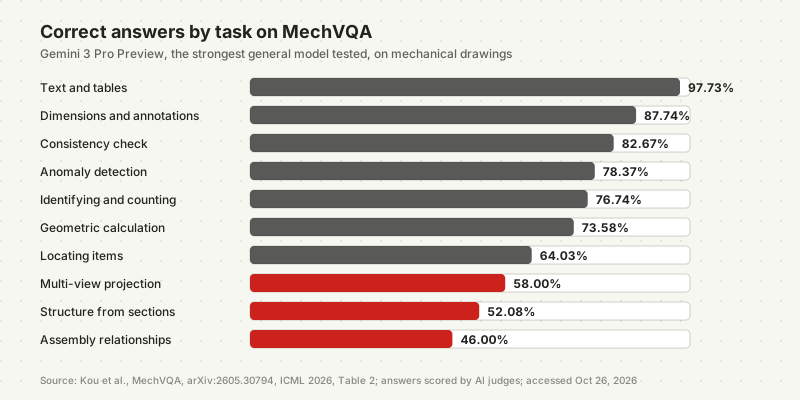
Read the scores with their conditions. MechVQA's drawings come from textbooks, handbooks and design platforms; its authors state that legacy blueprints and company-specific drafting practices are outside its scope.[1] Three AI models judged the answers, and the authors kept only questions on which several models agreed on an answer.[1] In our reading, that favours questions models can already answer; a customer's scan is unlikely to do better.
AI reads the words on a drawing almost perfectly. The part those words describe is where it goes wrong.
Drawings are not the only file where AI looks better than it measures. For workbooks, see what AI gets wrong in Excel; for error rates across tasks, see how reliable AI agents are on real work.
What does a technical drawing contain, and what does AI get right?
A technical drawing carries seven kinds of information a quote depends on, and AI reads them unevenly. The title block, whose fields ISO 7200 standardises, holds part number, material and revision. Views show the geometry. Dimensions and tolerances set sizes and limits. GD&T symbols under ISO 1101 or ASME Y14.5-2018 set form and position. Notes carry surface finish and heat treatment.[16][17][19] Published tests in 2024–2026 show AI strongest on the title block and weakest on GD&T, views and assemblies.[1][2]
| Drawing element | What it decides in a quote | Measured result |
|---|---|---|
| Title block and parts list | Part number, material, revision, quantity | 81.82–97.73% of text and table questions correct (MechVQA, 2026)[1] |
| Dimensions and annotations | Stock size, machining steps | 75.90–87.74% correct (MechVQA)[1] |
| General tolerance note | Limits for every dimension without its own tolerance | Not measured in any of the four evaluations[18] |
| GD&T frames | Inspection effort, machine and process choice | 25.39–37.27% of entries found (2024 models)[2] |
| Technical requirements | Surface treatment, heat treatment, chamfers, outside work | Model extractions needed expert correction in 43.7% of audited cases[1] |
| Views and sections | Geometry, hidden features | 44–60% multi-view, 52.08–79.17% section structure (MechVQA)[1] |
| Assembly relationships | Fits and mating parts | 46–62% (MechVQA)[1] |
The general tolerance note needs its own check. ISO 2768-1 sets tolerances for every dimension that carries none of its own, so a plain "50" means 50 within the tolerance class stated once on the sheet.[18] A model can copy "50" correctly and still miss the requirement. None of the four evaluations measures this, so put it in your own test.
The pattern matters more than any single figure. Four teams, with different drawings and different models, point the same way: words are read best; geometry, GD&T, counts and part designations worst.[1][2][3][4]
Why do general AI models misread drawings?
General AI models misread drawings because drawings are dense, partly rotated and built from line types, the conditions their own vendors list as weak spots. OpenAI's documentation in October 2026 says its models may struggle with small text, rotated text, graphs where "solid, dashed, or dotted lines" vary, and precise spatial localization.[6] A technical drawing has all four: hidden edges are dashed, centre lines are dash-dotted, and vertical dimensions are rotated.
The second cause is size. Claude scales larger images down to a long edge of 2,576 pixels on Claude 4.7 and later models, and 1,568 pixels on earlier ones.[7] An A1 sheet is 841 mm wide. Sent whole, it keeps about 3 pixels per millimetre at the higher limit and under 2 at the lower one, so a 3 mm dimension figure ends up roughly 9 or 6 pixels tall (our calculation). OpenAI says images may be resized before analysis, and Google says dense documents often need a higher resolution setting.[6][9]
An AI model does not see your drawing. It sees a smaller picture of it. OpenAI and Anthropic both document resizing, and Google ties detail to a resolution setting, so the smallest figure on the sheet is the first thing to check, not the last.
The MechVQA authors trace the rest to the drawing itself: the failure is "not merely optical recognition", but dense annotation, symbol clutter and weak spatial reasoning under projection rules.[1] Their own data shows where it lands:
- Views. When strong closed models pre-filled the benchmark's metadata, experts corrected the view count in 41.6% of audited cases and section views in 37.8%. The models usually undercounted views.[1]
- Notes. Technical requirements, such as surface treatment, heat-treatment values and chamfer notation, needed correction in 43.7% of cases. The part category needed correction in 1.0%.[1]
- Counts. OpenAI and Anthropic both document approximate counts.[6][7] On AECV-Bench floor plans, the three leading models counted doors exactly on 16–39% of plans.[3]
- Part numbers. On service-manual diagrams, Enginuity's authors found models "miss quantitative details or misread part designations", and warn that wrong part numbers or quantities "could lead to ordering errors".[4]
For distributors who quote spare parts from exploded views, the last point is the one to test first. Scan quality adds its own limits; text height and resolution are covered in what AI can and cannot read from your documents.
What do specialist drawing tools do differently?
Specialist drawing tools are trained on drawings and return named fields instead of a chat answer, and in research that training beats general models. In the November 2024 A*STAR study, a small model fine-tuned on 400 drawings found 51.34% of GD&T entries with 23.29% wrong, against 25.39% found and 40.97% wrong for GPT-4o.[2] On MechVQA, the authors' own trained model scored 84.85 of 100 against 77.28 for the best general model.[1]
A second A*STAR system, published in October 2025, detects the regions of a drawing first and then reads each region with a model trained on 1,406 drawings. Its builders measured an F1 score of 0.963 on numbers, such as dimensions, GD&T frames and roughness, and 0.672 on text in title blocks and notes.[5] That is the reverse of general models: strong on numbers, weaker on words. Both results come from the builders' own test sets.
Commercial tools make larger claims and publish less. As of October 2026:
| Tool | What the vendor documents | Accuracy statement | Independent test found |
|---|---|---|---|
| Werk24 (Munich) | Dimensions, tolerances, GD&T to ISO and ASME/ANSI and materials as structured data; each field traced to its place on the drawing; PDF, TIFF, PNG, JPEG[13] | 95% extraction accuracy "on standard annotations", up to 99% with a custom quality gate; method not published[13] | None |
| Paperless Parts Wingman 2.0 (US quoting software) | Surface finish, bend lines, chamfers, threads, weld symbols, dimension roles (May 2026)[14] | "14x more technical elements per drawing" than its predecessor; no accuracy figure[14] | None |
| CADDi (drawing data platform) | Geometry and specification values from 2D and 3D data; finds similar parts and drawings, searches past quotes[15] | No drawing accuracy figure[15] | None |
The table lists examples, not a ranking or a shortlist. What sets a specialist tool apart is the output: fields you can check one by one. Werk24, for example, documents a confidence value and a location on the drawing for every field.[13] That makes a field-level check possible; a chat answer gives no such trace.
Which file formats work best for AI?
A vector PDF exported from CAD is the best file a general AI assistant can get, and a scan is the worst. As of October 2026, ChatGPT, Claude and Gemini accept PDFs and images but list no CAD format, such as DXF, DWG or STEP, among their supported uploads.[10][11][12] Claude converts each PDF page into an image and adds the page's extracted text, which exists only when the PDF was exported rather than scanned.[8]
Three documented limits decide what the assistant actually sees:
- ChatGPT reads text and images in a PDF attached to a chat. For files saved to a project or a GPT, OpenAI warns that "embedded images may not be included automatically".[10] Attach drawings directly.
- Claude analyses the visual content of PDFs up to 100 pages; from 101 to 1,000 pages it processes text only.[11] A drawing set of more than 100 pages sent as one PDF loses its drawings.
- Images are capped at 20 MB in ChatGPT and 8,000 × 8,000 pixels in Claude, before any downscaling.[10][11][7]
The 3D model can carry more than the drawing. ISO 1101 allows tolerances to be attached to a 3D CAD model instead of shown on a sheet, and ASME Y14.5 covers models "defined in digital data files".[17][19] Specialist platforms such as CADDi read 2D and 3D data; the chat assistants above list no CAD format.[15][10][11][12]
In practice: ask customers for the vector PDF, not a scan or a photo, and for the STEP file alongside it. Send dense sheets whole and as crops of the detail views.
What happens to customer drawings you upload?
A customer drawing uploaded to an AI tool leaves your company under that tool's terms, and many drawings arrive under a non-disclosure agreement. As of October 2026, OpenAI states that it does not use content from business offerings such as the API and ChatGPT Enterprise to improve its models, while consumer plans depend on their settings.[10] Werk24 states that it processes drawings in the EU, in Frankfurt.[13]
- Read the agreement first. Some customer agreements restrict passing drawings to any third party, AI provider included.
- Use a business plan. Which providers train on uploaded content, plan by plan: which AI providers train on your data.
- Know where it is processed. Regions and their limits: whether data residency keeps AI data in Europe.
How do you test AI on your own drawings?
Test AI on a sample of your own drawings, field by field, against answers your estimator writes down first. The four published evaluations used between 120 and 3,281 drawings in 2024–2026 and still differ by model and by task, so no score transfers to your customers' files.[1][2][3][4] A field-level test shows which values AI can fill in and which always need a person, before it touches a quote.
Pick 30 recent drawings
Write the answer key first
Run the tool on the same files
Score missed and wrong separately
Check the hard cases
Decide field by field
The one-page version holds the six steps and a scoring grid for ten fields: Download the AI drawing test sheet (PDF).
When should drawing reading become part of your quoting system?
Drawing reading belongs in a quoting system when drawings arrive every day, several estimators handle them, and the extracted values feed a price, an ERP entry or an order. The research teams behind MechVQA and Enginuity both advised in 2026 against using their results without human oversight.[1][4] A system built for the process works within that limit.
A chat assistant answers each drawing anew and keeps no record of what it read. A system built around your quoting process reads each incoming drawing, fills only the fields that passed your test, flags the rest, and shows every value next to the place on the drawing it came from. An estimator approves before a price leaves the building.
That is a custom agent or custom software, with approval steps before anything is sent. For the quote itself, see what to check before an AI-drafted quote goes out.
Frequently asked questions
Can ChatGPT read engineering drawings? Partly. ChatGPT's models read the text on a drawing well and its geometry less reliably. On the MechVQA benchmark (ICML 2026), GPT-5 answered 93.18% of title-block and table questions correctly but 60% of multi-view and assembly questions. In a 2024 study, GPT-4o found 25.39% of the GD&T entries in a set of expert-annotated drawings. Check every value a quote depends on.
Which AI is best for reading engineering drawings? No tool has been independently shown to be reliable on company drawings. Among general models, Gemini 3 Pro Preview scored highest overall on MechVQA in 2026 (77.28 of 100), ahead of GPT-5 (75.44) and Claude Sonnet 4.5 (71.20). Specialist tools such as Werk24 state higher accuracy but publish no method. Test any tool on your own drawings.
Can AI check engineering drawings for errors? To a degree. On MechVQA (ICML 2026), general models answered 53.06% to 78.37% of anomaly questions correctly, such as missing or contradictory dimensions, and 64.00% to 82.67% of consistency questions. The AECV-Bench authors say AI should not be the sole source of truth for layout-critical checks. Use it to flag issues for an engineer, not to sign off a drawing.
Can ChatGPT read CAD files like DWG or STEP? Not as drawings. As of October 2026, OpenAI's list of supported ChatGPT uploads names PDFs, documents, spreadsheets, presentations and images, but no CAD format. Anthropic's and Google's upload pages for Claude and Gemini name none either. Export the drawing as a vector PDF, and use software built for CAD when the 3D model matters.
Notes
- Kou, Shi, Li et al., MechVQA: Benchmarking and Enhancing Multimodal LLMs on Comprehensive Mechanical Drawing Understanding, arXiv:2605.30794, May 29, 2026 (v2 July 7, 2026), ICML 2026, accessed October 26, 2026. Used for the drawing set, per-task scores (Table 2), metadata correction rates (Table 5), judging method and scope.
- Khan, Chen, Ng, Feng, Tan, Moon, Fine-Tuning Vision-Language Model for Automated Engineering Drawing Information Extraction, arXiv:2411.03707, November 6, 2024, accessed October 26, 2026. Used for GD&T precision, recall and hallucination of GPT-4o, Claude 3.5 Sonnet and fine-tuned Florence-2 (Table 1).
- Kondratenko, Birhane, Hsain, Maciocci, AECV-Bench: Benchmarking Multimodal Models on Architectural and Engineering Drawings Understanding, arXiv:2601.04819, January 8, 2026, accessed October 26, 2026.
- Kumar, Motiyani, Kasturi et al., Enginuity: A Dataset and Benchmark for Vision-Language Understanding of Engineering Diagrams, arXiv:2606.03410, June 2, 2026, accessed October 26, 2026.
- Khan, Yong, Chen et al., A Multi-Stage Hybrid Framework for Automated Interpretation of Multi-View Engineering Drawings Using Vision Language Model, arXiv:2510.21862, October 23, 2025, accessed October 26, 2026.
- OpenAI API documentation, Images and vision, accessed October 26, 2026. Used for the listed limitations and resizing.
- Claude Platform Docs, Vision, accessed October 26, 2026. Used for resolution tiers, image limits and listed limitations.
- Claude Platform Docs, PDF support, accessed October 26, 2026.
- Google AI for Developers, Media resolution, last updated October 13, 2026, accessed October 26, 2026.
- OpenAI Help Center, Uploading files and audio to ChatGPT, accessed October 26, 2026. Used for supported formats, image limit, PDF images, project files and data use.
- Anthropic Help Center, Upload files to Claude, July 23, 2026, accessed October 26, 2026.
- Gemini Apps Help, Upload & analyze files in Gemini Apps, accessed October 26, 2026.
- Werk24, AI Feature Extraction for Technical Drawings and product page, accessed October 26, 2026. Vendor statements.
- Paperless Parts, Paperless Parts Launches Wingman 2.0 to Bring Deeper Print Intelligence to the Quoting Workflow, May 6, 2026, accessed October 26, 2026. Vendor statements.
- CADDi, AI Data Platform for Manufacturing, accessed October 26, 2026. Vendor statements.
- ISO 7200:2004, Technical product documentation — Data fields in title blocks and document headers, accessed October 26, 2026.
- ISO 1101:2017, Geometrical product specifications (GPS) — Geometrical tolerancing, accessed October 26, 2026.
- ISO 2768-1:1989, General tolerances — Part 1, accessed October 26, 2026.
- ASME, Y14.5 — Dimensioning and Tolerancing, 2018 (reaffirmed 2024), accessed October 26, 2026.