Managing an AI agent is not a technical task — it is an operational one. Most agents are abandoned within 90 days because no named owner takes on the post-launch management work. The recurring job takes 30–45 minutes per week: reviewing outputs, updating instructions when the business changes, and making deliberate decisions about scope.
What kind of job is managing an AI agent?
Managing an AI agent is an operational job, not a technical one. The skills it requires are the same ones used to manage a new hire: reviewing work, giving feedback, and deciding over time how much autonomy to extend.
When a Hermes or OpenClaw implementation goes live, the most common founder reaction is relief — the agent is running, the workflow is moving. What follows, quietly, is drift. Instructions that matched the business at launch no longer match it three months later. Edge cases the agent was never briefed on start appearing. Nobody reviews the outputs. The agent produces increasingly poor results and eventually stops getting used.
The solution to agent drift is organisational, not technical. Assign one named person — not a committee — to own the agent relationship. That person does three things on a recurring basis: reviews outputs, updates instructions when the business changes, and makes deliberate decisions about scope. Treat the agent the way you would treat a capable new hire: feedback, calibration, and progressive trust over time.
What does AI agent management look like week to week?
Managing a well-configured AI agent takes 30–45 minutes per week. Not a block of time — three lightweight recurring tasks distributed across the week.
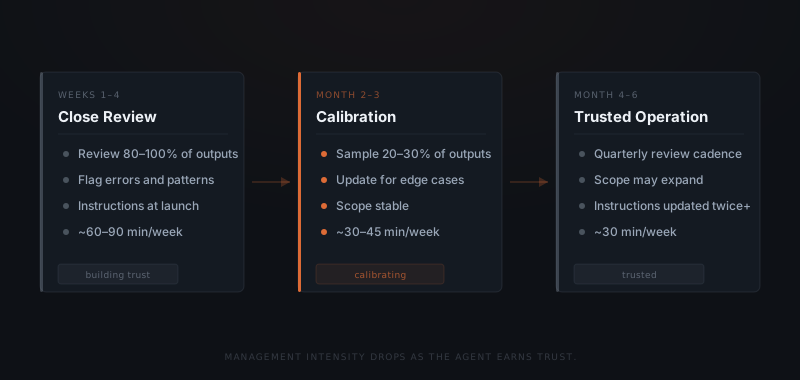
The first task is output review. Not every output every time — a sample. In the first four weeks, review 80–100% of outputs. By month three, a 20–30% sample is sufficient if the agent is performing well. Flag errors when they appear, note patterns, and carry those patterns back to the instructions.
The second task is instruction updates. Instructions written at launch reflect what the business looked like at launch. When a client type changes, a new workflow gets added, or a common edge case starts appearing regularly, the instructions need updating. A well-structured brief takes 10–15 minutes to revise. For guidance on writing effective agent instructions, see how to brief an AI agent.
The third task is scope decisions. Every month, ask two questions: Is the agent handling tasks it was never explicitly authorised to take on? And are there tasks the agent could now handle that it currently isn't? The first question calls for a pullback. The second calls for an expansion. Both are deliberate decisions, not defaults.
The table below shows what the cadence looks like across a quarter, including the tasks that are easy to skip and the ones that compound if skipped.
| Task | Frequency | Time required | What you are looking for |
|---|---|---|---|
| Output sampling | Weekly | 10–15 min | Errors, format drift, unauthorised scope expansion |
| Instruction review | Monthly | 15–20 min | Does the brief still match current workflow reality? |
| Scope decision | Monthly | 5–10 min | Is the agent taking on too much, or could it take on more? |
| Full instruction audit | Quarterly | 30 min | End-to-end review against current business state |
| Integration check | Quarterly | 15 min | CRM fields changed, team updated, workflow modified? |
How do you know when something needs to change?
The agent does the work. You manage the exceptions — and the scope.
The agent signals what it needs through its output patterns. Three patterns point to three different actions.
Approving 90% or more of outputs unchanged means the instructions are calibrated and the agent understands the task well. Expand scope — take on a new workflow category or a more complex variant of the current one.
Editing 50% or more of outputs means the instructions are misaligned. The task category is not wrong, but the format, tone, or judgment calls are off. Return to the instructions and tighten the definition of what good output looks like. For a broader framework on assessing performance, see how to know if your AI agent is actually working.
Scope growing without a deliberate decision — outputs being approved for tasks outside the original brief — means the boundary has drifted. Document the expanded scope explicitly or pull it back. Silent scope growth is the early sign of lost control, not expanded capability.
The full range of signals an agent produces — and what each one means — maps to a specific action. Treating these as a diagnostic rather than a judgment call makes the management job more consistent.
| Output signal | What it means | Action |
|---|---|---|
| 90%+ outputs approved unchanged for 4+ weeks | Instructions calibrated; agent performing well | Expand scope or add adjacent workflow category |
| 50%+ outputs edited before sending | Instructions misaligned with current expectations | Rewrite format and tone sections of the brief |
| Repeated similar errors on one task type | Edge case not defined in instructions | Add specific handling rule to the brief for that case |
| Scope expanding without a decision | Boundaries have drifted; agent taking on unauthorised tasks | Audit outputs; formalise expanded scope or retract it |
| Team usage dropping | Agent outputs no longer matching team needs | Full brief review; interview the team about what has shifted |
| Escalation rate rising over time | More exceptions than agent was scoped for | Assess whether scope needs narrowing or brief needs expanding |
Why do most AI agents fail after launch?
No named owner after launch is the most common reason agents are abandoned within 90 days. Management is not a technical task — it is an organisational one. If no name is attached to it, it defaults to nobody.
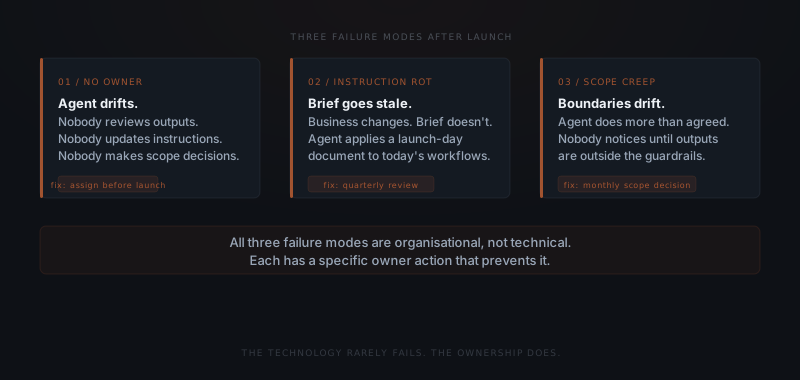
Gartner forecasts that 30% of AI projects will be abandoned after proof of concept through 2026.[1] The technical build is not what fails — the operational relationship is. Three failure modes account for most abandonments.
No owner. An agent without a named owner has many supervisors and none. Everyone assumes someone else is reviewing it. Nobody updates the instructions. Nobody makes scope decisions. The agent drifts, outputs degrade, and the business stops using it. Assigning a named owner is the first structural decision in any implementation — it happens before launch, not after.
Instruction rot. Instructions written at launch reflect the business at launch. Six months later, the business has changed — new clients, new team members, new workflows — but the instructions haven't. The agent applies an outdated brief to current tasks. A quarterly instruction review — 30 minutes, one person — prevents rot from becoming failure.
Silent scope creep. The agent starts handling more than it was scoped for. Sometimes this is positive — capability has grown and the scope should expand. Sometimes the agent is operating outside its guardrails. Without deliberate scope decisions, neither the owner nor the business knows which situation applies.
A fourth failure mode is less commonly named but just as common: over-reliance. The agent performs well for two months, the team stops reviewing outputs, and the first instruction rot goes undetected until it has been generating poor outputs for weeks. Maintaining a 20–30% sampling rate regardless of track record prevents this from compounding.
The table below maps each failure mode to its detection signal and the specific action that resolves it.
| Failure mode | How it appears | Root cause | Fix |
|---|---|---|---|
| No owner | Outputs stop being reviewed; instructions never updated | No name assigned before launch | Assign one owner at implementation; it is a pre-launch requirement |
| Instruction rot | Agent applies outdated format, tone, or persona | Instructions not updated after business changes | Quarterly brief audit; update immediately after any workflow change |
| Silent scope creep | Agent handling tasks outside original brief | No scope review cadence | Monthly scope check; require explicit sign-off for any expansion |
| Over-reliance | Team stops reviewing outputs after initial strong performance | False confidence; no mandated sampling floor | Maintain 20–30% sampling regardless of apparent performance |
| Under-use | Agent available but team reverts to manual habits | Handoff never formalised | Remove the manual task from the team's task list explicitly |
How to set up management before the agent goes live
Post-launch failure is almost always traceable to something that was not set up before launch. The management structure — owner, review cadence, escalation path, documentation location — should exist before the agent handles its first task, not after the first problem appears.
Assign one named owner
One person, not a committee. The owner does not need technical skills — they need to understand the workflow and have authority to change the scope. Write the name down before the agent goes live.
Define the review cadence
Agree on the sampling rate for the first four weeks (80–100%), what triggers a full instruction review, and who gets notified when the agent flags an exception. A verbal agreement is not enough — write it down.
Document the escalation path
Specify who receives escalations from the agent and on what timeline. If the agent routes an exception and nobody picks it up within 24 hours, what happens? Answering this before launch prevents it from being answered during an exception.
Set the scope boundary in writing
Document what the agent is authorised to do and — explicitly — what it is not. The boundary that is unwritten drifts. The one written down at launch becomes the reference for every scope decision that follows.
Remove the task from the team's manual queue
If the agent is taking over candidate follow-up, remove candidate follow-up from the coordinator's task list. An agent running in parallel with the same task performed manually creates double work and no clarity about which version is authoritative.
Schedule the first instruction review
Put the 30-day instruction review on the calendar before the agent goes live. If it is not scheduled, it defaults to never.
What does a well-managed AI agent look like at six months?
Six months in, a well-managed agent looks different from what launched — not because the implementation changed, but because the relationship deepened.
The scope is broader than at launch. Not dramatically — one or two workflow categories added after deliberate decisions, not drift. The instructions have been updated at least twice. The owner can point to a log of scope decisions: what was added, when, and why.
The owner spends less time than in month one. A 30-minute weekly sample review has replaced the close read of every output. The agent handles edge cases it could not on day one — because those cases appeared, the owner logged them, and the instructions were updated to cover them. For a full picture of what the ongoing operational layer involves, see what AI agent maintenance actually looks like.
| Milestone | What it signals |
|---|---|
| Week 4: sampling rate drops from 100% to 30% | Agent has earned initial trust through consistent outputs |
| Month 2: first instruction update | Business has changed enough to warrant a brief revision |
| Month 3: first scope expansion | Agent performing well enough to take on adjacent workflow |
| Month 6: owner spends under 30 min/week | Full management rhythm is established; no active calibration needed |
The agent has not been abandoned. That is the baseline, and 30% of implementations do not clear it.[1] The difference between the ones that do and the ones that don't is not the technology — it is whether someone treated managing the agent as a job worth owning. Understanding what an AI agent is capable of is the starting point. Managing one well is what keeps that capability working.
Frequently asked questions
How much time does managing an AI agent take per week? Managing a well-configured AI agent takes 30–45 minutes per week, distributed across three tasks: output sampling, instruction updates when the business changes, and monthly scope decisions. The time is higher in the first four weeks — closer to 60–90 minutes — and drops as the agent earns trust through consistent performance.
What is the difference between managing an AI agent and maintaining one? Managing an AI agent means reviewing outputs, adjusting instructions, and making scope decisions on a recurring basis. Maintenance refers to the technical layer — monitoring uptime, updating integrations, and handling platform changes. For most operators, management is the day-to-day job. Maintenance is background infrastructure work handled by the implementation team.
Who should own AI agent management in a small team? One named person — not a committee. In a founder-led business, this is typically the founder or the person who owns the workflow the agent handles. The owner does not need technical skills. The owner needs to understand the workflow well enough to review outputs and have the authority to change the scope.
When should you expand what your AI agent handles? Expand scope when the agent is approving 90% or more of outputs without edits, has been running stably for at least four weeks at the current scope, and you have identified a specific adjacent task the agent can take on. Expand one task category at a time and review outputs closely for the first two weeks after each expansion.
Notes
- Gartner, Top Strategic Technology Trends 2024, Gartner Research. https://www.gartner.com/en/information-technology/insights/artificial-intelligence