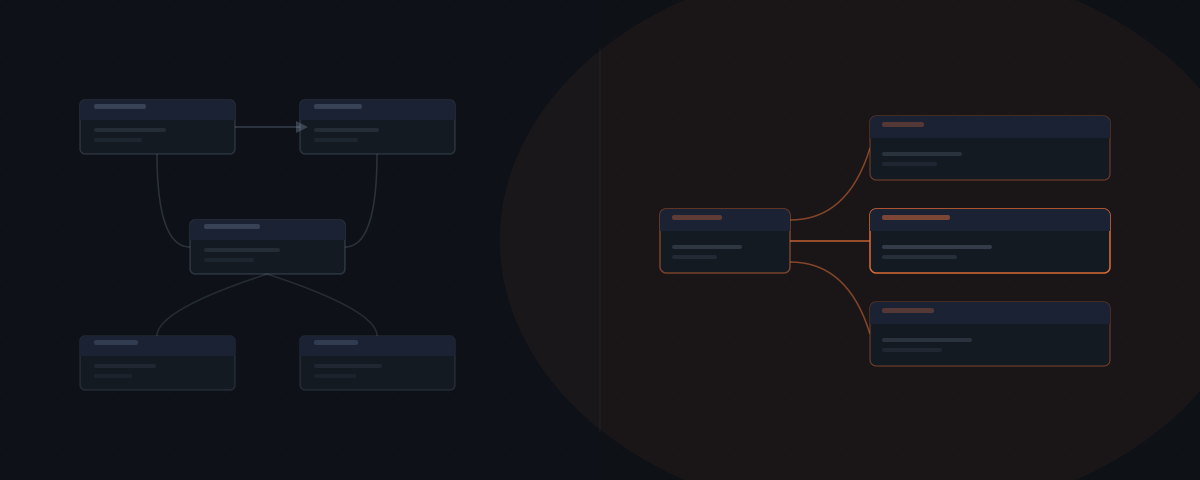
Make and AI agents solve different problems. Make executes workflow sequences reliably when inputs are predictable and the steps are fixed. An AI agent reads context, handles variation, and decides what to do when inputs change. Businesses that replace Make with an agent for the wrong task type end up with less reliable automation. The right question is not which tool is better — it is which task belongs to each one.
An operations lead at a six-person consulting firm migrates their client intake workflow from Make to an AI agent because the demos look impressive. Two weeks later, every intake confirmation email has slightly different formatting — minor phrasing variations, inconsistent field names, occasional tone drift. Make had sent the same email every time, perfectly. The agent was more capable. It was also worse at this specific task. The problem was not the agent. The task was wrong for the tool.
Make vs. AI agent: side-by-side
The comparison only makes sense at the task level — both tools can trigger actions, both connect to external systems, both automate work. What they cannot do is swap roles without degrading results.
| Make | AI agent | |
|---|---|---|
| Decision logic | Pre-configured branches only | Reads context and decides at runtime |
| Handles unstructured input | No — skips or errors | Yes |
| Output consistency | Deterministic — same every time | Variable — adapts to input |
| Setup | Hours to days | 2–8 weeks |
| Best task type | Structured data flows, scheduled triggers | Variable, context-dependent tasks |
| Pricing | $9–$29/month (by credit volume) | $200–750/month infrastructure + API |
| Maintenance | Low — unless workflow structure changes | Medium — prompt updates, integration drift |
| Failure mode | Silent skip or error on unexpected input | Wrong decision on ambiguous input |
| Native integrations | 3,000+ apps⁶ | Built per deployment |
The pricing comparison needs context. Make charges by credits — its billing unit for module executions — with 10,000 credits included on the $9/month Core plan.⁵ An AI agent charges by infrastructure and API usage, not by item count. For high-volume structured tasks, Make is significantly cheaper. For variable tasks where Make would require hundreds of custom branches, the agent is the only practical option.
Make automates the sequences you've already mapped
Make.com is a visual workflow builder. When a trigger fires — a form submission, a webhook, a new CRM record — Make runs the configured module sequence. The output is deterministic: the same input always produces the same output. Make does not read context, adapt to variation, or make decisions. Make matches a condition and executes.
Make's canvas architecture requires every decision branch to be configured in advance. If data arrives in a format you did not configure, Make skips the item silently or throws an error. If a new workflow variant appears, Make requires a new module path. Every route through the canvas must be explicitly mapped before the workflow runs.
This is not a limitation — it is the design. Determinism is what makes Make reliable for structured tasks. A Stripe payment always creates the same Notion entry. A Typeform submission always creates the same HubSpot contact. That consistency is valuable precisely because Make does not introduce variation.
Make requires every branch to be defined before the workflow runs. If data arrives in a format you didn't configure, Make skips it silently or errors. An AI agent reads the data and decides what to do — no pre-mapped branch required.
According to Gartner data cited by Prefactor, 40% of enterprise applications will embed task-specific AI agents by the end of 2026, up from less than 5% in 2025.[¹] The growth reflects a genuine division of labour — not agents replacing workflow tools, but agents handling the task types that workflow tools were never designed for.
Make's canvas requires every branch mapped in advance
Make's router needs a defined path for every case before the scenario runs — enterprise lead here, SMB lead there, everything else skipped or errored. An AI agent reads the input as it arrives and decides which action fits, with no router path required in advance. For the full breakdown of when a workflow needs rules versus judgment, see AI agent vs. automation.
What building blocks make up a Make scenario?
A Make scenario is built from five recurring elements: modules, routers, iterators, aggregators, and a data store.² Knowing what each one does explains both where Make excels and where its canvas hits a wall.
| Element | What it does | Where it breaks down |
|---|---|---|
| Module | Runs one action inside one connected app | Executes fine; cannot infer intent from content |
| Router | Splits the scenario into pre-built branches | Needs a branch defined for every case in advance |
| Iterator | Turns an array into one bundle per item² | Consumes one credit per item — cost scales with volume |
| Aggregator | Merges bundles back into a single output² | Needs a fixed merge rule, not a judgment call |
| Data store | Holds records the scenario reads and writes mid-run | Structured fields only — no free-text reasoning |
| Error handler | Applies one of five fixed rules when a module fails⁴ | Follows the rule; does not diagnose why it failed |
Modules connect to one app and perform one action — create a HubSpot contact, send a Slack message, update a Notion page. Each runs in sequence along the canvas.
Routers split a scenario into parallel routes based on a condition. A lead arrives; the router sends it down the enterprise path or the SMB path, each built out separately in advance. Make will not improvise a third path for a lead that fits neither.
Iterators convert an array into a series of separate bundles, one per item.² A single webhook carrying 40 order line items becomes 40 individual runs through everything downstream. Iterators are how Make loops — and each item consumes its own execution, which matters for cost.
Aggregators do the reverse: they collect several bundles and merge them into one output.² Forty processed line items become one summary record written back to a spreadsheet.
Make's five error-handler directives — Break, Resume, Ignore, Commit, and Rollback — attach to individual modules, not the whole scenario.⁴ Resume substitutes a fallback value. Ignore lets the scenario continue past a failed module. Rollback reverts what it can and marks the run as an error. None of them reason about why the module failed — each follows the rule you picked for it.
Make's built-in data store holds structured records the scenario can read and write to mid-run, functioning as a lightweight database without leaving the canvas.
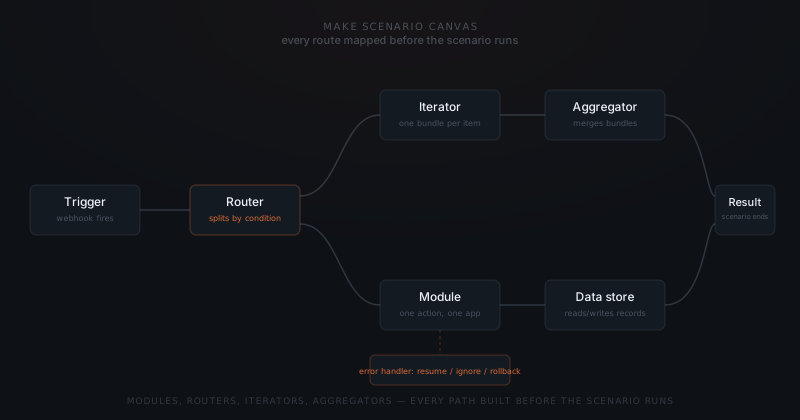
These five elements are what a visual workflow builder means in practice. They also explain why Make scales well for volume and poorly for variation: every router branch, every error-handling rule, and every data store field has to be specified before the scenario goes live.
How does Make's credit pricing change cost at scale?
Make prices scenarios in credits — its current billing term for what earlier documentation called operations.⁵ Each module action consumes one credit: sending a Slack message, updating a CRM record, fetching a row. Code execution costs more, at 2 credits per second of runtime.⁵
The Free plan includes 1,000 credits a month. Core starts at $9/month for 10,000 credits, Pro at $16, Teams at $29 — each scaling to higher credit tiers as volume grows.⁵ Credits used beyond the plan allowance cost more per unit than the included allotment.
Iterators are where credit costs surprise people. An iterator does not spend one credit on the array — it spends one per item.² A scenario processing 500 order line items runs 500 module executions through everything downstream of that iterator, not one. A workflow that looks like a handful of steps on the canvas can burn thousands of credits a month once the iterator is handling real volume.
This is the opposite cost profile from an agent. An agent's cost scales with API tokens per task, close to flat regardless of how the input is structured. Make's cost scales with the number of bundles moving through the canvas — cheap at low volume, worth watching once routers and iterators start fanning a workflow out into hundreds of per-item executions.
What Make does better than an agent
Make handles three task types better than an AI agent. Using an agent for these tasks introduces problems.
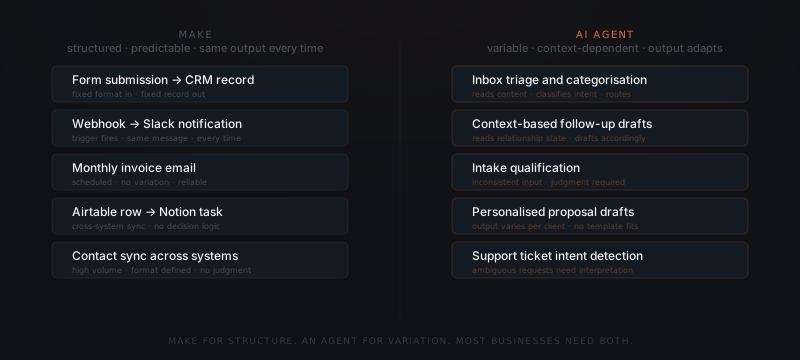
Structured data flows. Moving records between systems when the format is consistent — a new Typeform submission creates a HubSpot contact, a completed Stripe payment triggers a Notion entry, a new Airtable row creates a Monday task. The input format is defined. The output format is defined. An agent adds unnecessary variability where consistency is required.
Scheduled triggers. Running the same action at a defined interval — sending a weekly digest, syncing a data source every hour, generating a monthly report. Make executes these reliably on schedule, at one credit per run. An agent is not suited for time-triggered, non-contextual operations.
High-volume tasks with no decision logic. Processing form submissions, syncing contacts across systems, routing items by a fixed field value. Volume does not change the decision logic, and each execution still costs one credit whether it is the first run or the ten-thousandth. For these tasks, Make is faster, cheaper, and more reliable than an agent.
What an AI agent does better than Make
An AI agent handles tasks where the right action depends on what the input contains — not just that the trigger fired.
Email triage and routing. Incoming emails arrive in inconsistent formats. A support request, a partnership inquiry, and a billing question can arrive in the same inbox. Make cannot distinguish them without a custom filter for every variant. An AI agent reads each email, classifies the intent, and routes or drafts a response appropriate to the content.
Follow-up sequences with variable context. A follow-up that should differ based on whether the prospect opened the proposal, attended the call, or went silent requires reading context. Make can send a follow-up on a timer. An agent drafts the message based on the current state of the relationship.
Intake qualification with incomplete data. New leads arrive through several channels with inconsistent information. An agent reads each submission, identifies what is missing or ambiguous, and routes the lead or drafts a clarification request accordingly. Make can route based on a field value but cannot reason about what the field means.
The decision criteria for readiness are covered in how to know if a business process is ready to hand to an AI agent.
Where is Make's connector library strong, and where is it thin?
Make lists over 3,000 pre-built apps in its integration library.⁶ That covers the software most service businesses already run: HubSpot, Salesforce, Stripe, Airtable, Google Workspace, Slack, Notion.
Zapier's own developer platform claims more than 9,000 connected apps — close to three times Make's count.⁷ The gap shows up in niche and vertical-specific software: regional payment processors, industry-specific CRMs, and smaller SaaS tools with a narrow user base are more likely to have a Zapier integration than a native Make module.
For a workflow built entirely on mainstream tools, Make's 3,000+ apps cover the ground. For a workflow that touches a niche vertical tool with no native module, the choice is an HTTP or webhook connection inside Make, a different automation platform, or an agent built to call that tool's API directly. An agent implementation is not bounded by either platform's app list — it connects to whatever API the business already has, native module or not.
How to run Make and an AI agent in the same workflow
The most practical setup for a service business is not Make or an AI agent — it is both, doing different jobs in the same workflow.
Make handles the structured hand-offs. A new qualified lead lands in the CRM. Make creates the record, assigns the owner, and notifies the team in Slack. These three steps always happen in the same sequence with the same outputs. No agent needed.
The agent handles the variable response. The agent reads the new lead record, checks for previous contact history, and drafts a personalised outreach email for approval. The draft depends on what the record contains. Make could not produce this draft without a template for every scenario.
Make itself ships an AI Agent module now, launched in beta in 2025 and expanded through 2026.⁸ It lets you build a reasoning step inside the canvas: connect an LLM such as OpenAI, Claude, Mistral, or Google Vertex AI, give it a goal, and let it choose which of the scenario's existing modules to call next.⁸ Make's own documentation describes the module as working alongside deterministic logic, not instead of it — it still runs inside one scenario, with human approval points a builder configures, and it still only calls apps someone already connected to Make.⁹
That is the boundary worth understanding before choosing a hybrid setup. A Make AI Agent module reasons over the roughly 3,000 apps Make already knows how to call.⁶ It does not read a forwarded email thread stretching back two years, weigh it against a CRM's full account history, and draft a reply that reflects both — that needs context held across turns, not reset with every new trigger. A standalone agent implementation, built on something like Hermes or a custom agent, carries that context instead of starting over each run.
The two tools run in sequence: Make creates the data structure, the agent acts on the content. Neither replaces the other.
Make maps the process. An agent handles what falls outside the map.
Deciding which workflow gets converted first follows the same sequencing logic covered in which workflows to automate first.
When to migrate from Make to an agent — and when not to
Businesses migrate Make workflows to AI agents for the wrong reasons more often than the right ones. The trigger for migration is usually that Make "feels limited" — but limitation is not a reason to switch. The right reason to migrate a Make workflow to an agent is that the workflow has decision logic you are currently faking with filters and condition branches.
Signs a Make workflow is ready to migrate:
- You have 10+ condition branches trying to cover every input variation
- New input formats regularly break the workflow and require a new branch
- The workflow produces outputs that need manual correction because Make cannot read context
- Credit consumption keeps climbing because a router or iterator is fanning a judgment call out into hundreds of per-item branches
Signs a Make workflow should stay in Make:
- Structured input, structured output, no decision logic
- The workflow runs on a schedule with no input variation
- Volume is high and the output needs to be identical every time
- The workflow connects standard tools using Make's native integrations
Here is what that looks like in practice. A property management company runs new maintenance requests through Make: a structured webhook from the tenant portal creates a ticket, assigns a vendor, and notifies the tenant. That stays in Make — the input format never changes. Then tenants start emailing requests directly instead of using the portal — no fixed fields, photos attached inline, urgency buried in the wording. Make's webhook trigger has nothing to parse. That is the migration point, not because Make got worse, but because the input stopped being structured. An agent reads the email, pulls out what a webhook would have delivered as clean fields, and creates the same ticket Make would have — from an input Make cannot process at all.
How to migrate without disrupting operations: Run the agent and Make workflow in parallel for two to four weeks before switching. Compare outputs. If the agent produces better outputs on the variable cases and equivalent outputs on the structured cases, switch. If the agent introduces variability on tasks that needed consistency, keep Make for those tasks and use the agent only where it outperforms.
Most service businesses end up with both tools running in the same system — Make for data structure, agents for content decisions. That split is more reliable than trying to force either tool to do everything.
The most common mistake is migrating a structured workflow to an agent because the agent seems more capable. Capability is not the relevant variable. Consistency is. Make's determinism is a feature, not a limitation. An agent's variability is also a feature — for the task types that need it. Matching the tool to the task type is the entire decision. Get that right and both tools perform reliably. Get it wrong and neither one will.
For the broader version of this same tool-vs-agent question across the wider automation-tool category, see AI tools vs. agents.
Frequently asked questions
What is the difference between Make and an AI agent? Make executes predefined workflow sequences — when a trigger fires, it runs the configured modules with consistent output. An AI agent reads context and makes decisions — the same trigger produces different outputs depending on what the input contains. Make is reliable for structured, predictable workflows. An AI agent handles variation that Make cannot process.
Can you replace Make with an AI agent? Only for tasks where the input varies or the right action depends on content. For structured data flows, scheduled triggers, and high-volume tasks with no decision logic, Make remains the better tool. Replacing Make with an agent for those tasks introduces output variability where consistency is required.
Do Make and an AI agent work together in the same workflow? Yes — and this is the most practical architecture for most service businesses. Make handles structured hand-offs: record creation, routing, notifications. The agent handles variable tasks: drafting, categorising, qualifying. Each covers the part of the workflow the other cannot.
What happens when you use an AI agent for tasks Make is better at? The agent introduces variability into a workflow that needed consistency. A confirmation email becomes slightly different on every send. A data sync produces inconsistent field formats. The agent is not failing — it is doing what agents do. The task was wrong for the tool.
Can Make.com run an AI agent? Make ships its own AI Agent module, launched in 2025 and expanded through 2026. It lets a scenario call a connected LLM to decide which of the scenario's modules to act on next, with human approval points built in. The module runs inside a single scenario and only reaches the roughly 3,000 apps Make has native connections for — it does not carry memory across separate scenarios or read channels outside Make's app list. For that, a standalone agent implementation is required.
What does Make.com cost compared to an AI agent implementation? Make runs $9 to $29 a month depending on plan and credit volume, with each module action consuming one credit. An AI agent implementation costs more upfront — commonly $2,000 to $8,000 to build — plus ongoing API usage. Make is cheaper for high-volume structured tasks. An agent earns its higher setup cost only where the task requires reading and deciding, not executing a mapped sequence.
Notes
- Prefactor, "AI Agent Adoption Statistics 2026," Prefactor, 2026.
- Make Help Center, "Router." Make Help Center, "Iterator." Make Help Center, "Aggregator."
- Make Help Center, "Iterator." Make Help Center, "Aggregator."
- Make Help Center, "Error handlers."
- Make.com, "Pricing."
- Make.com, "Integrations."
- Zapier, "Developer Platform."
- Make.com, "Make AI Agents."
- Make Help Center, "Make AI Agents: The next step in automation."
- Make.com, "When to use AI Agents versus automation?," Make, 2025.
- Syntora, "Complex Workflow Limitations of Zapier, Make, and n8n," Syntora, 2025.