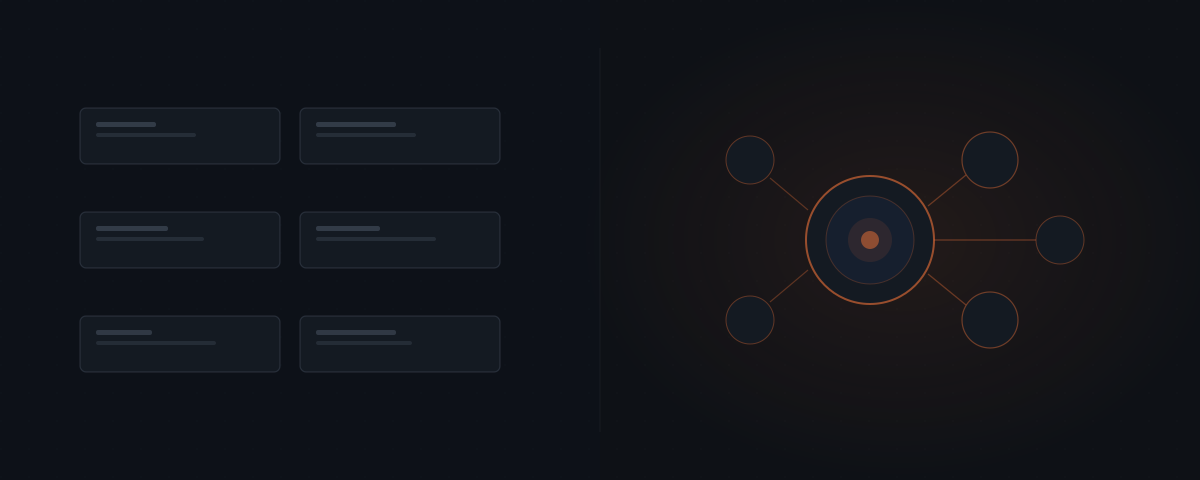
General-purpose AI tools — ChatGPT, Claude, Copilot — respond to prompts on demand. No persistent state. No scheduled execution. No live data. A purpose-built agent system runs on a trigger, pulls from live business data, and executes on a schedule without manual setup. The two have different architectures and different failure modes. A poor result with one says nothing about whether the other would work on the same workflow.
AI tools and agent systems do different jobs
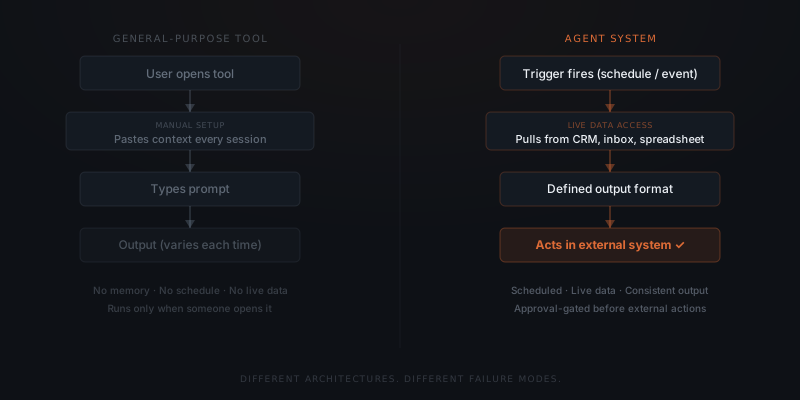
A general-purpose AI tool — ChatGPT, Claude, Microsoft Copilot — responds to prompts on demand. The user opens the tool, provides context, and receives output. No memory persists between sessions. No scheduled execution. No connection to live business data. No actions in external systems without manual setup each time.
A purpose-built agent system executes on a trigger — a scheduled time, an event in a connected system, or a threshold in live data. The agent pulls from connected business systems: the current CRM stage for a contact, unread email threads from a client, the invoice record past its due date. The agent produces a defined output and, where configured, acts in external systems — pending human approval.
These are architecturally distinct categories. One responds when asked. The other runs when conditions are met.
The two categories compared across eight dimensions that determine which fits a given workflow:
| Dimension | General-purpose tool (ChatGPT, Claude, Copilot) | Purpose-built agent system |
|---|---|---|
| Execution model | On-demand — user initiates each run manually | Triggered — runs when a condition is met, on schedule |
| Memory and state | None — context starts fresh each session | Reads from and writes to connected business systems |
| Data access | Whatever the user pastes in that session | Live data from CRM, inbox, ATS, calendar, or other connected tools |
| Output consistency | Varies with how context is provided each session | Defined output format — same structure every run |
| Actions in external systems | None without manual copy-paste | Approval-gated execution in connected tools |
| Maintenance responsibility | None — tool vendor manages the product | Business owner manages integration drift and prompt updates |
| Setup time | None | Days to weeks |
| Cost | $20–$200/month subscription | $2,000–$8,000 setup + $100–$400/year API |
What breaks when a business workflow runs through a general-purpose tool
The failure pattern is consistent across the teams that report it. A founder pastes CRM notes into a chat window and requests a client status email. The output is good. Next session, the context is gone — the founder pastes it again. Two weeks later, the workflow runs only on days when someone remembers to open the tool.
General-purpose tools have no persistent memory between sessions, no live data connections, and no scheduled execution. Running a business workflow through one requires manual context input every time, produces inconsistent output when that context varies, and does not execute without a person initiating it.
IBM's 2023 Global AI Adoption Index reports that while 42% of companies are actively deploying AI tools, fewer than half of those deployments involve workflows that run automatically in production — the majority operate as on-demand tools requiring human initiation each session.1
The same workflow — generating a weekly client status update across eight clients — looks different across the three approaches:
Manual (no AI). The founder opens each client file, reads the project notes, writes the update, and sends it. 4–6 hours per week. Everything is accurate and personalised because the founder knows each relationship. The bottleneck is the founder's time.
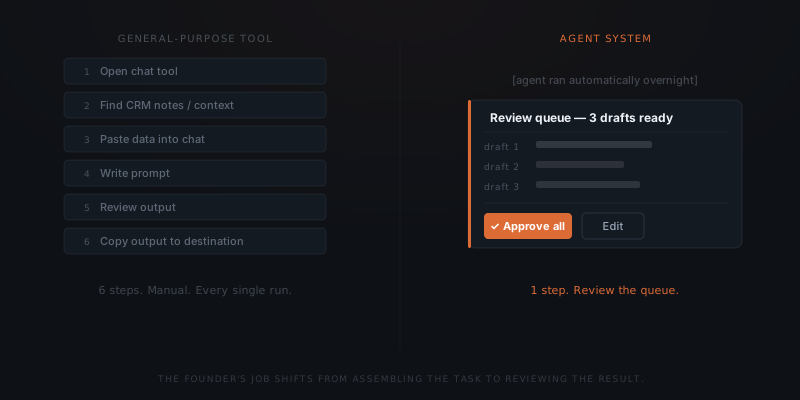
General-purpose tool (ChatGPT, Claude). The founder opens the tool, pastes the relevant notes for each client, generates a draft, copies it to the email client, and sends. 2–3 hours per week. Output quality depends on what context the founder remembers to paste that day. Some updates are better than the manual version; some are worse because context was incomplete or different from the previous week. The bottleneck is still the founder's initiation and assembly work — the AI eliminated the writing time but not the setup time.
Agent system. The agent runs at 7am Monday, pulls the current project status for each client from the CRM, generates a draft for each, and routes all eight to the approval queue. The founder reviews and approves in 20–30 minutes. Output is consistent, based on live data, and runs whether or not the founder remembered to start it. The bottleneck is the review step — by design. The weekly time cost drops from 2–6 hours of active work to 20–30 minutes of review. The founder's role shifts from doing to approving.
The inconsistency founders experience with general-purpose tools is not an AI capability problem. It is an architecture problem. General-purpose tools were not built to run workflows — they were built to respond to prompts.
What a purpose-built agent system adds
An agent system adds four capabilities a general-purpose tool lacks by design.
Scheduled execution. The workflow runs at a configured trigger — a fixed time, an event, or a condition in connected data — without a person initiating it. A Monday morning client update runs at 8am regardless of whether anyone opened a browser.
Live data access. The agent pulls the current CRM stage, unread email threads, or the latest project entries — not what a user pastes in. The output reflects current business state.
Defined output format. The agent produces the same structure every run: a draft message, a Slack summary, a CRM field update — not freeform text that changes shape depending on the prompt.
Actions in external systems. The agent can send a message, update a record, or create a task — approval-gated by default. The draft waits in a queue until a human releases it.
The choice between the two approaches is rarely ambiguous once the workflow is examined honestly. When to use each, by workflow characteristic:
| Workflow characteristic | General-purpose tool | Agent system |
|---|---|---|
| Runs once or rarely | ✓ | |
| Runs weekly or more often | ✓ | |
| Requires live data from connected systems | ✓ | |
| Works on manually assembled context | ✓ | |
| Needs to take action in external tools | ✓ | |
| Output used only by the person generating it | ✓ | |
| Output goes to clients or into business records | ✓ | |
| Must run without human initiation | ✓ | |
| Needs to handle variation in input format | ✓ |
Failing with a general-purpose tool tells you nothing about whether a purpose-built system would work.
Why a bad result with a general-purpose tool is not a reliable signal
The failure happened at the interface layer. The founder experienced what running a workflow through a prompt-response tool looks like: manual setup every session, variable output, no execution without human initiation. That experience is accurate for that product category.
An agent system built for the same workflow has different failure modes. Agent systems fail when integrations drift after vendor API updates, when input data formats change in connected systems, or when prompts become outdated as business language shifts. These are maintenance problems — specific, solvable, and handled externally. They are not the same as the structural limitations of a general-purpose tool.
Agent systems have their own failure modes — but they are different in kind from general-purpose tool failures. Where a tool fails because of architectural limitations, an agent system fails because of maintenance gaps. Integration drift is the most common: a connected tool updates its API and a field name changes, causing the agent to read null data. Prompt drift is the second most common: business terminology shifts over six months and the agent's instructions no longer match how people on the team describe their workflows. Data quality problems in the connected CRM or inbox cause the agent to produce correct-looking outputs built on wrong inputs.
All three failure modes are diagnosable, specific, and fixable. None of them are structural limitations of agent technology — they are the maintenance work that comes with running live integrations. A team that expects zero maintenance from a deployed agent will experience these as failures; a team that expects a monthly review cycle treats them as routine adjustments.
The maintenance cadence for a well-running agent system is not continuous — it is periodic. Integration drift surfaces when a connected vendor pushes an API update, typically a few times per year. Prompt drift surfaces when the agent's outputs start needing more edits than usual — a signal the instructions no longer match the current workflow. Data quality problems surface as clustered errors in the output rather than random ones. Each failure mode has a specific diagnostic and a specific fix. None require starting over from scratch. The distinction from general-purpose tool failures is fundamental: tool failures are architectural and cannot be fixed without switching products; agent failures are operational and can be addressed with targeted maintenance.
How to move from ad-hoc tool use to a configured agent system
Most businesses that successfully deploy an agent system follow a recognisable transition pattern. Understanding the pattern in advance makes the move faster.
Identify the workflow running on manual tool use
The most common signal is a workflow someone runs every week by opening the tool, pasting the same context assembled from the previous run, generating output, and copying it to its destination. This pattern — open, paste, generate, copy — is the workflow to systemise first because every step in the pattern except "generate" can be eliminated.
Document the context the tool needs every session
Whatever a person pastes in is the data the agent needs to pull automatically. If the context is CRM notes, the agent connects to the CRM. If it is inbox threads, the agent connects to the inbox. If it is a project status update from Notion, the agent connects to Notion. The manual assembly step becomes an integration — the data pulls happen without a person collecting it.
Define the output format explicitly
If the tool sometimes generates a one-paragraph update and sometimes generates a three-paragraph update depending on how the prompt is phrased that day, the output is undefined. An agent produces a defined structure every run. Settling on the format before configuration — what sections, what length, what tone — significantly speeds the setup and improves consistency from day one.
Replace human initiation with a trigger
The question "when does this workflow run?" becomes a configuration choice rather than a human habit. A scheduled time, a CRM event, or an inbox condition replaces the human opening the tool and beginning the session. The workflow runs when it should, not when someone remembers to run it.
The useful evaluation is a workflow readiness check: identify the trigger, the data sources, the output format, and the edge cases that don't follow the main path. That analysis answers whether an agent system fits a specific workflow — independent of any prior experience with a tool built for a different job.
Once the workflow is ready, the next decision is whether the configured agent system should be custom-built or run on an off-the-shelf platform — see custom vs. off-the-shelf.
Frequently asked questions
What is the difference between a general-purpose AI tool and an agent system?
A general-purpose AI tool — ChatGPT, Claude, Copilot — responds to prompts on demand. The user provides context each session; the tool produces output. A purpose-built agent system runs on a trigger, pulls from live business data, produces a defined output format, and takes actions in external systems. General-purpose tools require human initiation every run. Agent systems execute on a schedule without manual setup.
Why do general-purpose AI tools produce inconsistent results on business workflows?
General-purpose tools have no persistent memory between sessions, no live data connections, and no scheduled execution. Output quality varies because context quality varies — whoever opens the tool provides whatever context they remember that session. Agent systems connect directly to live business data, so the input is always the same structured data rather than a user's manual reconstruction of it.
If ChatGPT didn't work for our process, does that mean an agent system won't work either?
No. A poor result with ChatGPT on a business workflow indicates that the general-purpose tool architecture is not suited to that workflow — not that an agent system would fail. Evaluating an agent system requires separate analysis: Is the workflow defined with a consistent trigger and output format? Are the data sources accessible via integration? Who handles maintenance? Those questions are independent of any prior general-purpose tool experience.
What makes a workflow a good fit for an agent system?
A workflow fits an agent system when it has a consistent trigger, consistent inputs from connected data sources, a defined output format, and a low exception rate on the main path. All four conditions are assessable before any implementation work begins. Candidate follow-up for recruiting agencies, client project status updates for consultancies, and invoice reminders for service businesses all follow this shape. The first workflow to automate is the one that runs identically most of the time.
Notes
Footnotes
-
IBM Institute for Business Value, "Global AI Adoption Index 2023," IBM, 2023. The report surveyed 8,584 IT professionals across 20 countries. The deployment figure refers to the proportion of AI tool deployments configured for automated, scheduled execution versus on-demand use. ↩